

For this Gamma research paper to presentation test, I used a real published paper to see how well the tool could turn it into slides.
Turning a research paper into presentation slides sounds like exactly the kind of task AI should be good at.
A paper already has the structure, data, figures, and conclusions. In theory, an AI presentation tool should just need to identify what matters, condense it, and arrange it into a readable set of slides.
But for academic work, there is a much more important question:
Can you trust the slides it creates?
If you’re new to Gamma and want a broader look at how it works for students, you can also read my Gamma Review for Students.
Instead of giving Gamma a summary or writing a prompt that told it what to include, I uploaded the original PDF and let Gamma decide how to turn it into a 10-slide presentation.
The result was better than I expected visually.
It was also a good reminder of why AI-generated academic slides still need to be checked against the source.
This article contains affiliate links. If you sign up through one of them, I may earn a commission at no extra cost to you.
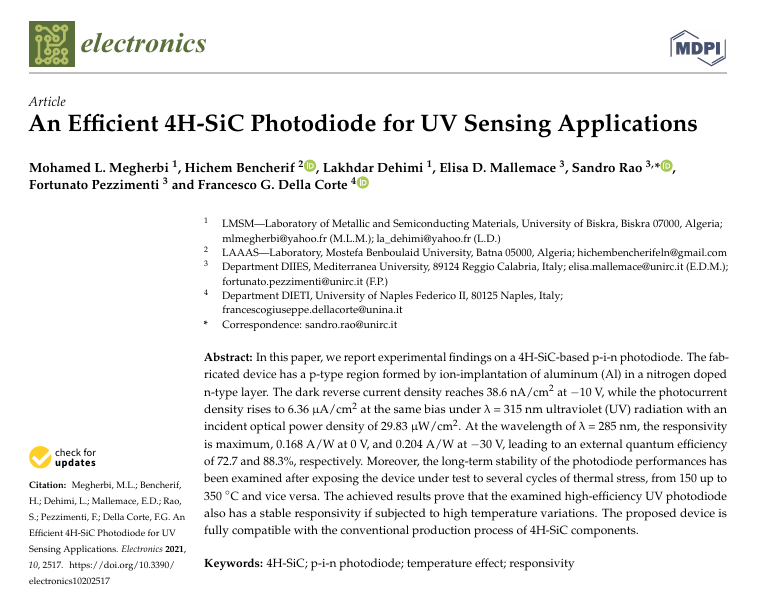
The paper I used for this test
For this experiment, I used the open-access paper:
“An Efficient 4H-SiC Photodiode for UV Sensing Applications”
published in Electronics in 2021.
I chose this paper for two reasons.
First, it contains the kind of material that makes presentation generation genuinely useful: device structure, electrical measurements, optical response, numerical results, comparisons with earlier work, and a thermal stability test.
Second, I work with semiconductor research myself, so I could check whether Gamma was interpreting the technical details correctly rather than simply judging whether the slides looked convincing.
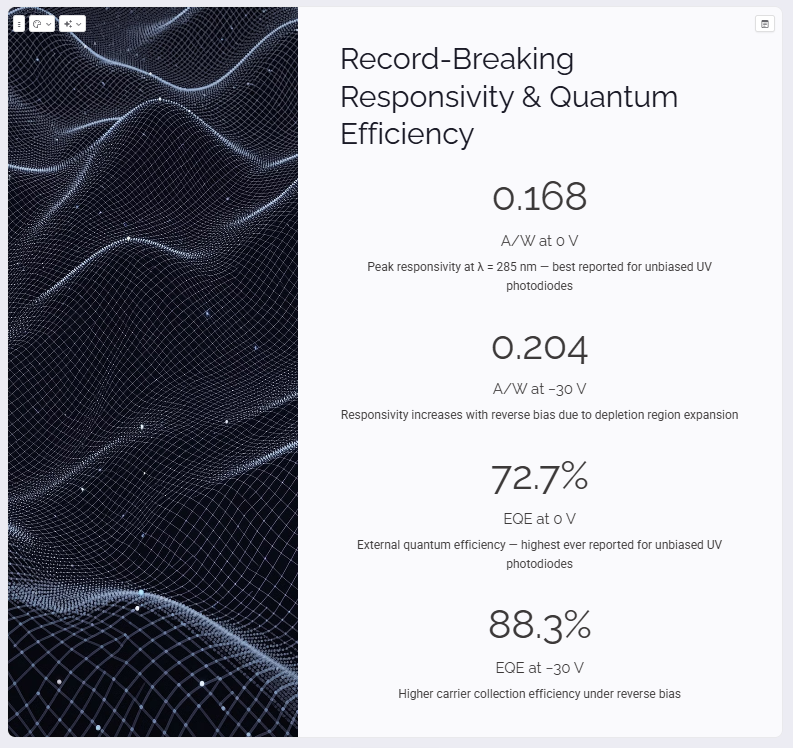
The paper reports a 4H-SiC p-i-n UV photodiode, including a peak responsivity of 0.168 A/W at 0 V and 0.204 A/W at −30 V, corresponding to external quantum efficiencies of 72.7% and 88.3%. It also investigates device stability after thermal stress up to 350°C.
That gave Gamma plenty of technical information to work with—and plenty of opportunities to get something wrong.
Step 1: Import the research paper into Gamma
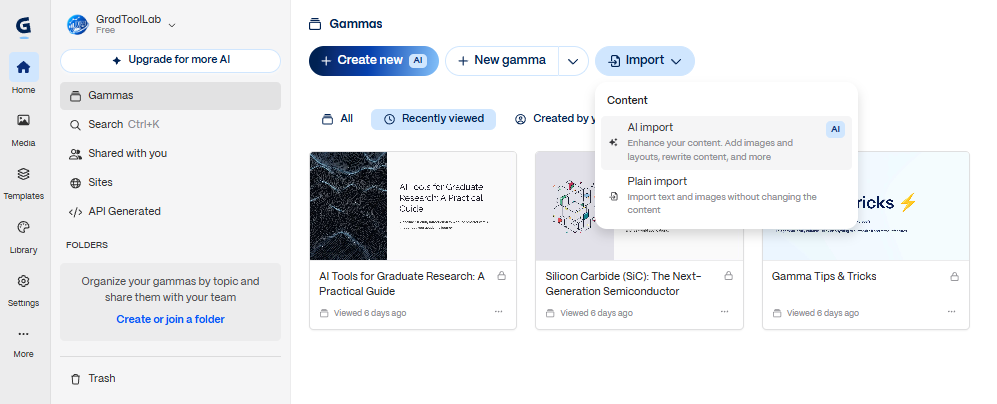
From the Gamma dashboard, I clicked Import.
Gamma gave me two options:
- AI import
- Plain import
Plain import is designed to bring existing text and images into Gamma without substantially changing the content.
For this test, I wanted Gamma to actually interpret and restructure the research paper into presentation-friendly content, so I chose AI import.
This is an important distinction.
I wasn’t trying to recreate the PDF inside Gamma. I wanted to see whether Gamma could take a dense academic source and decide what belonged in a presentation.
Step 2: Upload the PDF
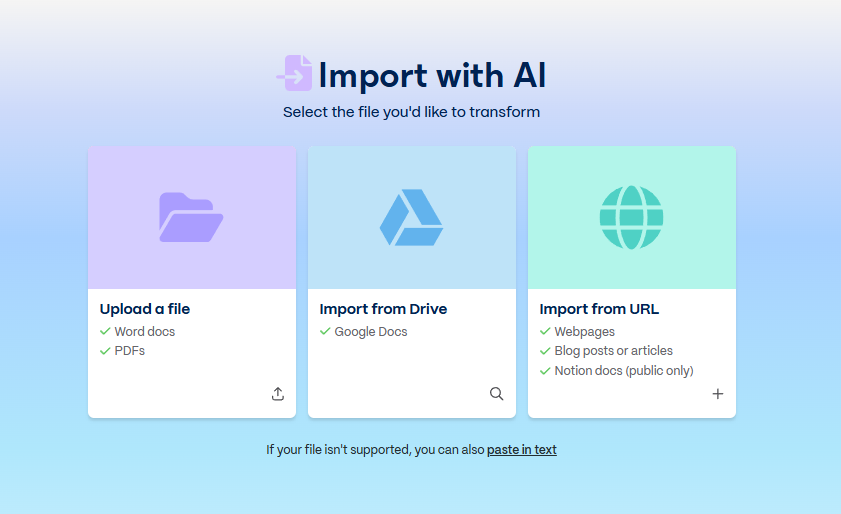
After selecting AI import, Gamma gave me three source options:
- Upload a file
- Import from Google Drive
- Import from URL
Because I had already downloaded the paper, I chose Upload a file and selected the PDF from my computer.
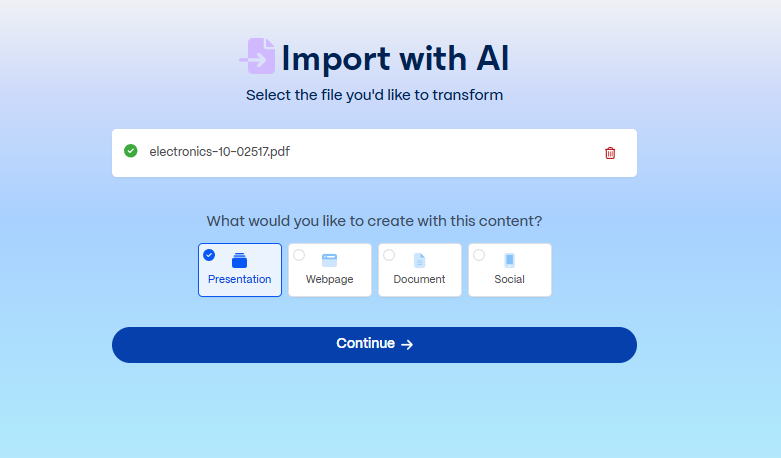
Once the upload completed, Gamma asked what I wanted to create from the source.
The available options included a presentation, webpage, document, and social content.
I selected Presentation.
Up to this point, I had not summarized the research paper myself.
That was intentional.
I wanted the first result to show what Gamma would do with the paper on its own.
Step 3: Keep the first generation simple
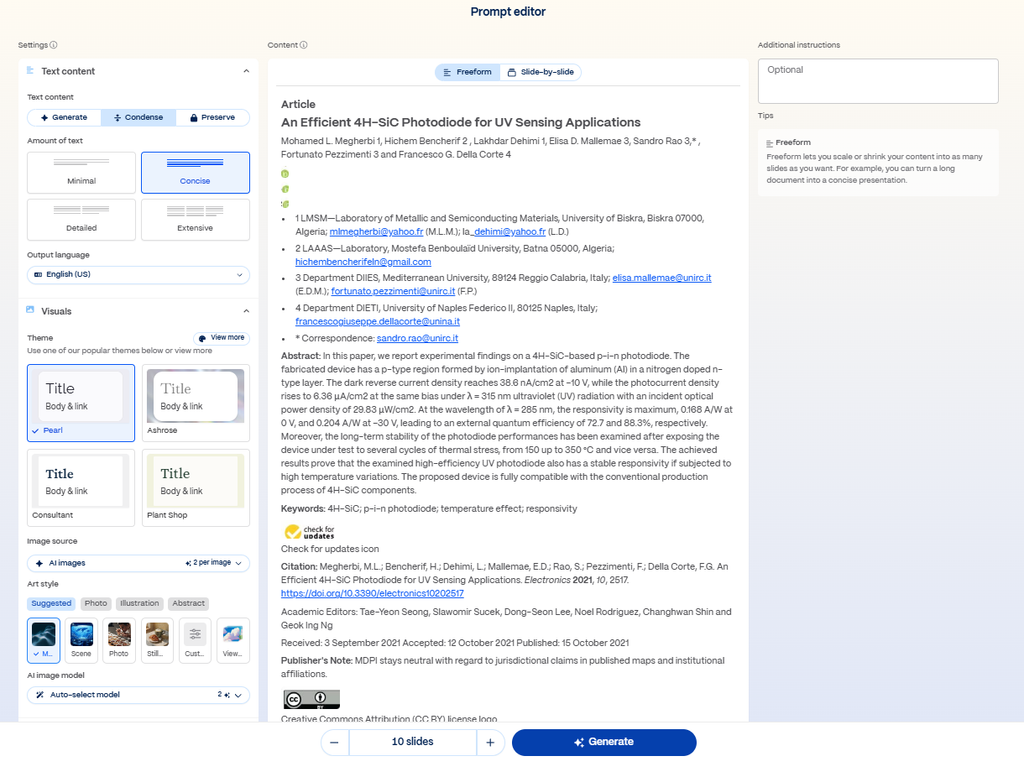
After importing the PDF, Gamma opened its Prompt Editor and extracted the paper’s content.
For my first attempt, I kept the settings simple:
- Text content: Condense
- Amount of text: Concise
- Language: English (US)
- Structure: Freeform
- Length: 10 slides
- Additional instructions: none
I also left the additional instructions field empty.
I could have told Gamma something like:
Focus on device structure, responsivity, EQE, and thermal stability for a graduate-level research presentation.
That probably would have produced a more targeted presentation.
But doing that would also make the test less interesting.
I wanted to know what happens when a student has a paper and essentially says:
“Turn this into a presentation.”
Then I clicked Generate.
The Gamma research paper presentation was surprisingly polished
Gamma produced a 10-slide presentation covering:
- The paper and authors
- Why 4H-SiC is useful for UV detection
- Device structure and fabrication
- Dark I–V characteristics
- UV photoresponse
- Responsivity and quantum efficiency
- Comparison with prior work
- Bias dependence and viewing angle
- Thermal stability
- Conclusions
That is actually a sensible structure for this paper.
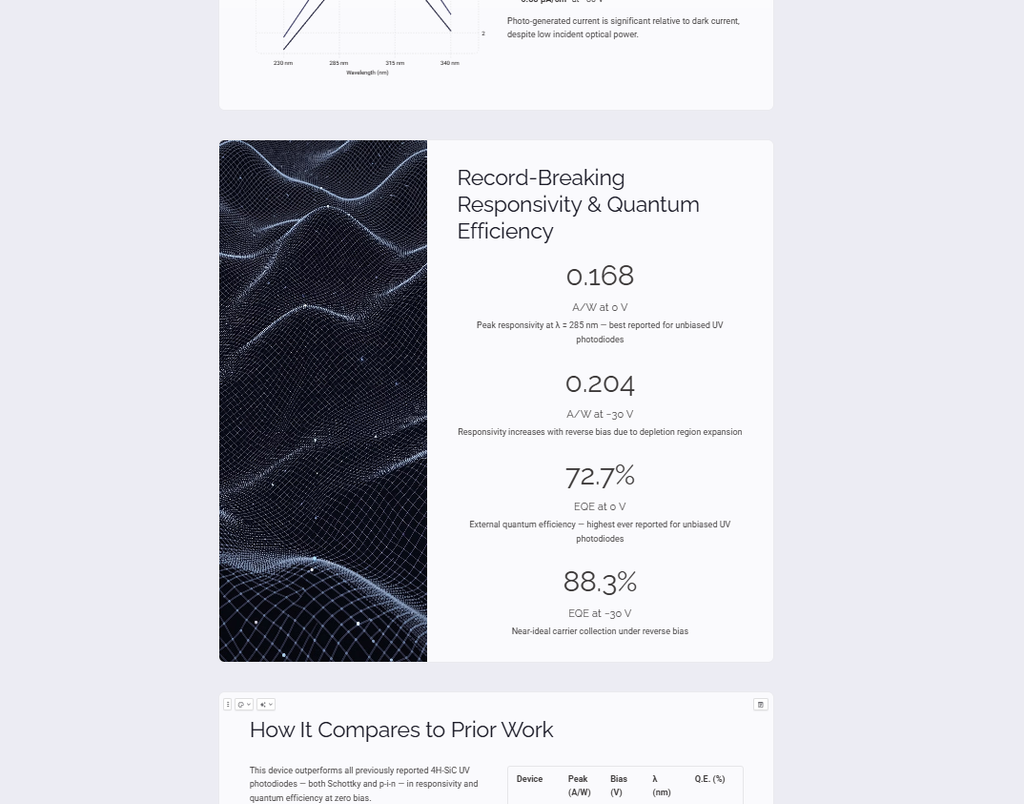
The generated deck also pulled out many of the important numerical results correctly.
For example, it identified:
- 38.6 nA/cm² dark current density at −10 V
- 0.168 A/W responsivity at 0 V
- 0.204 A/W at −30 V
- 72.7% EQE at 0 V
- 88.3% EQE at −30 V
Those values are supported by the original paper.
Visually, the result also looked much closer to a finished presentation than a raw AI summary.
If I were only judging Gamma by appearance, I would have been impressed.
Then I started checking the numbers.
Step 4: Fact-check the AI-generated slides
This is where the test became much more useful.
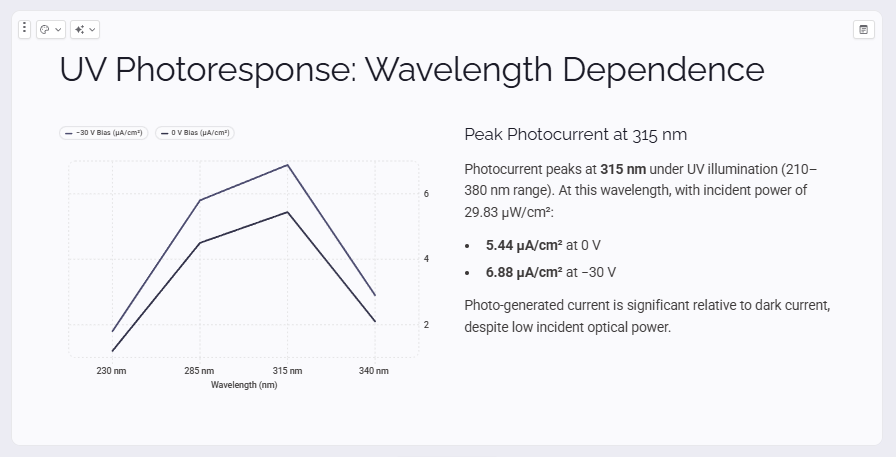
One slide summarized the UV photoresponse at 315 nm.
Gamma originally wrote that the incident optical power was:
29.83 µW/cm²
and paired that with:
- 5.44 µA/cm² at 0 V
- 6.88 µA/cm² at −30 V
At first glance, nothing about those numbers looked obviously suspicious.
They were technical, specific, and all came from the paper.
The problem was that they did not come from the same part of the paper.
The paper itself contains an inconsistency
In the abstract, the authors report an incident optical power density of 29.83 µW/cm², together with a photocurrent density of 6.36 µA/cm² at −10 V.
But in the Results section, the paper reports 29.83 nW/cm² at 315 nm, together with:
- 5.44 µA/cm² at 0 V
- 6.88 µA/cm² at −30 V
So Gamma appears to have taken the µW/cm² value from the abstract and combined it with the current values from the Results section.
That is a subtle failure mode.
Gamma did not invent a completely fictional number.
Instead, it produced a plausible-looking statement by combining real pieces of information that should not have been combined.
For research work, that can be more dangerous than an obvious hallucination.
This was probably the most useful lesson from the entire test:
A slide can contain only “real” numbers and still represent the source incorrectly.
I found a few wording problems too
The numerical mismatch was the clearest issue, but I also noticed places where Gamma made the paper sound more certain than it actually was.
One slide described the 88.3% EQE result as:
“Near-ideal carrier collection under reverse bias.”
The original paper explains that increasing reverse bias expands the depletion region and improves carrier collection efficiency.
It does not make the stronger “near-ideal” characterization.
Another slide originally stated that the device:
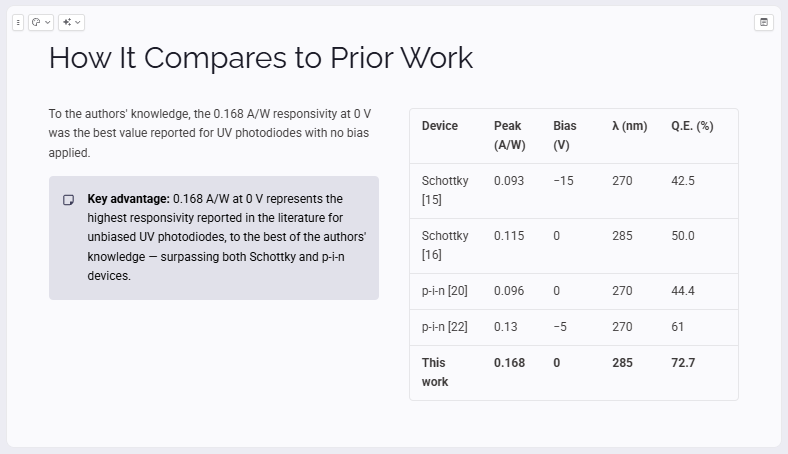
“outperforms all previously reported 4H-SiC UV photodiodes.”
The paper itself is more careful.
It says, in effect, “to our knowledge”, and specifically frames the 0.168 A/W result as the best reported value for UV photodiodes with no bias applied.
Those qualifiers matter in academic writing.
Removing them can turn a reasonable research claim into something broader than the authors actually demonstrated.
Step 5: Fix the slides with Gamma Agent
I could have edited each problem manually.
Instead, I wanted to see whether Gamma Agent could correct the presentation after I identified the issues.
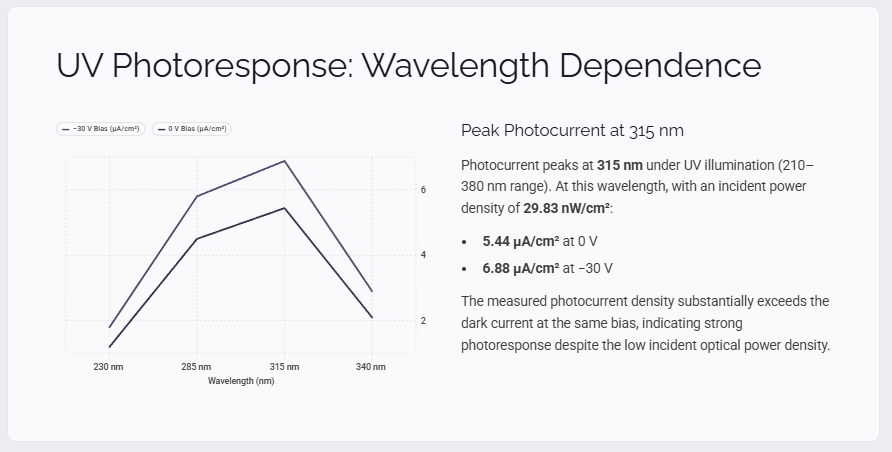
For the UV photoresponse slide, I told Gamma to use the internally consistent values from the Results section.
The revised slide now showed:
- 29.83 nW/cm²
- 5.44 µA/cm² at 0 V
- 6.88 µA/cm² at −30 V
For the responsivity slide, I asked Gamma to replace:
“Near-ideal carrier collection under reverse bias”
with the more conservative:
“Higher carrier collection efficiency under reverse bias.”
And for the comparison slide, I asked it to restore the qualification from the paper.
The revised version begins:
“To the authors’ knowledge…”
and specifies that the result refers to UV photodiodes with no bias applied.
This part worked well.
I didn’t have to rebuild the cards, resize the text, or recreate the layout. Gamma Agent revised the content while preserving the overall design.
But there is an important distinction:
Gamma was good at fixing the problems once I identified them. It did not identify those problems for me.
That matters a lot if you are thinking about using it for academic work.
Step 6: Export the finished presentation
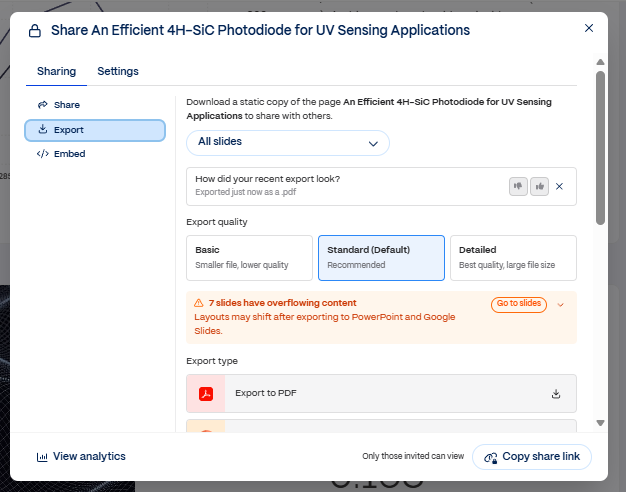
Once I was happy with the corrections, I opened Gamma’s export menu.
I used the standard export quality and exported all 10 slides as a PDF.
Gamma displayed a warning that seven slides contained overflowing content and that layouts could shift when exporting to PowerPoint or Google Slides.
That sounded concerning, so I checked the exported PDF itself.
In my test, all 10 PDF pages looked intact. I did not find major text clipping, overlap, or broken layouts.
The corrected UV photoresponse values were also preserved in the final PDF, as were the revised carrier-collection wording and the more cautious prior-work claim.
This does mean I would still inspect the final output every time—especially if exporting to an editable PowerPoint file rather than PDF.
What Gamma did well
After this test, I think Gamma is genuinely useful for turning a research paper into a first draft of a presentation.
The strongest part was not simply that it summarized the paper.
It created a sensible narrative.
Instead of giving me ten slides of slightly shorter academic prose, it separated the paper into recognizable presentation sections: motivation, device structure, electrical characteristics, optical results, comparison, thermal stability, and conclusion.
It also extracted many of the key numerical values correctly.
And once I identified inaccurate or overly strong wording, Gamma Agent made targeted corrections without forcing me to rebuild the slides manually.
For a student starting from a blank presentation, that can save a meaningful amount of setup time.
If you want to see the basic workflow in more detail, I also have a step-by-step Gamma guide for students that walks through creating and editing a presentation from scratch.
Where I would not trust Gamma automatically
The biggest weakness is also the reason I would never submit an academic presentation directly after generation.
Gamma can produce something that looks finished before it has been verified.
That creates a dangerous temptation.
The polished layout makes the information feel more authoritative than a messy AI-generated text response would.
In this test, the most interesting error was not a random hallucination. Gamma combined information from two conflicting parts of the source into a new statement that looked perfectly reasonable.
It also strengthened some research claims by removing qualifiers or adding interpretive wording.
Those are exactly the kinds of mistakes that can survive a quick visual review.
My workflow for using Gamma with research papers
After this experiment, this is the workflow I would actually use:
- Upload the original paper
- Let Gamma create the first slide structure
- Check every quantitative result against the paper
- Pay extra attention to units, bias conditions, wavelengths, sample sizes, and comparison claims
- Look for words such as “best,” “highest,” “ideal,” “proves,” and “outperforms”
- Use Gamma Agent to correct specific problems
- Export the presentation
- Check the exported file one final time
I would treat Gamma as a presentation assistant, not as the final scientific reviewer.
That is still useful.
In fact, I think that distinction is what makes the tool practical rather than disappointing.
So, can Gamma turn a research paper into a presentation?
Yes—but I would call the result a strong first draft, not a finished academic presentation.
In this test, Gamma successfully turned a nine-page semiconductor paper into a coherent 10-slide deck.
It identified most of the important topics and numerical results, produced a polished layout, and made later corrections easy.
But it also showed why researchers and graduate students still need to understand the source material themselves.
The most significant problem I found could easily have gone unnoticed because every individual number looked legitimate.
That is the tradeoff.
Gamma can remove a lot of the mechanical work of starting a presentation.
It cannot remove your responsibility to check the science.
For me, that is still a useful deal.
Quick verdict
Best for:
Graduate students and researchers who already understand their source material and want to create a presentation draft faster.
What I liked:
Fast PDF import, sensible slide structure, polished layouts, easy corrections with Gamma Agent.
What I would watch carefully:
Numbers, units, conditions attached to measurements, and AI wording that makes source claims sound stronger than they are.
Would I use it again?
Yes—as a starting point.
Not as the final fact-checker.
Source used in this test
Megherbi, M. L., Bencherif, H., Dehimi, L., Mallemace, E. D., Rao, S., Pezzimenti, F., & Della Corte, F. G. (2021). An Efficient 4H-SiC Photodiode for UV Sensing Applications. Electronics, 10, 2517.
The source paper is published under a Creative Commons Attribution (CC BY) license.