
AI presentation tools promise to turn a simple prompt into a polished presentation in minutes. But are they actually useful for university students, especially when the topic is technical?
I tested Gamma by asking it to create a presentation about Silicon Carbide (SiC), a semiconductor material I am familiar with.
My first impression was simple: I was surprised by how quickly Gamma created a clean and easy-to-understand presentation.
But after checking the technical details and experimenting with Gamma’s AI editing tools, I also found some important limitations.
Here is what happened.
Disclosure: This article contains affiliate links. If you sign up through them, I may earn a commission at no extra cost to you.
Quick Verdict
Gamma is excellent for creating the first draft of a presentation quickly.
For students, I think its biggest strengths are:
- Creating a clear presentation structure almost instantly
- Producing clean, modern-looking slides without much design work
- Helping you understand the basic structure of an unfamiliar topic
- Making AI-assisted edits with simple natural-language instructions
However, I would not rely on Gamma alone for technical or academic accuracy.
If you are creating a university presentation, Gamma can save a lot of time — but you should still verify important information yourself.
What I Asked Gamma to Create
For my test, I asked Gamma to create a short introductory presentation about Silicon Carbide (SiC) for university engineering students.
I wanted it to explain topics such as:
- What SiC is
- Basic physical properties
- Differences between SiC and conventional silicon
- High-temperature applications
- Radiation tolerance
- Major applications
- Advantages and limitations
Gamma automatically organized these topics into a complete presentation.
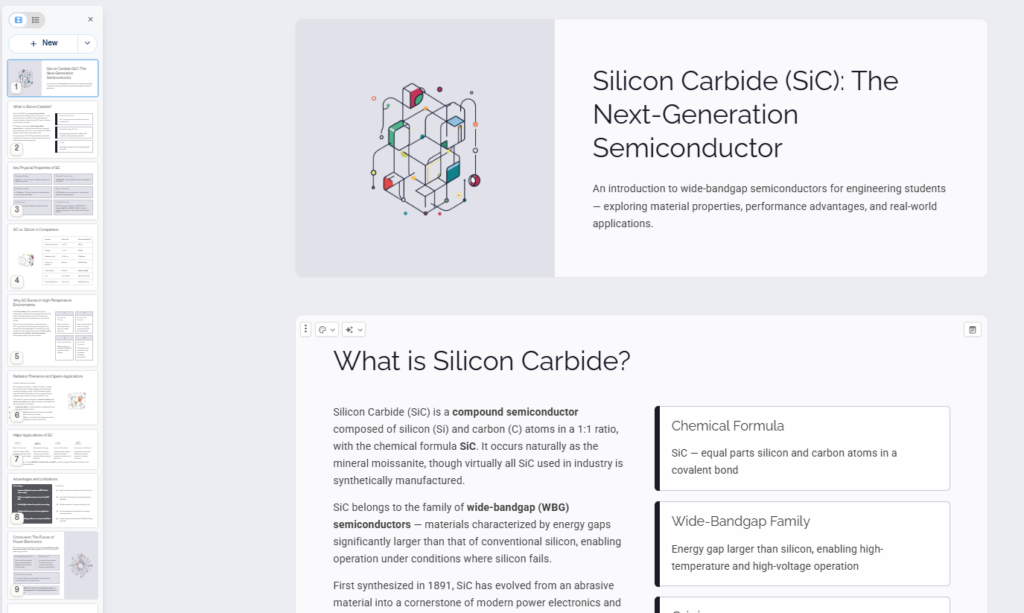
The result included slides covering the basic definition of SiC, its physical properties, a comparison with silicon, high-temperature environments, radiation applications, major applications, advantages and limitations, and a conclusion.
My First Impression: Surprisingly Fast and Clear
What impressed me most was the speed.
Instead of starting with a blank PowerPoint file and deciding how to organize every slide, Gamma generated the structure, text, and visual design for me.
The slides were also very simple and easy to follow.
For example, Gamma automatically created a comparison table between silicon and SiC covering properties such as bandgap, breakdown field, cost, and technology maturity.
That is exactly the kind of information I might have manually organized into a table myself.
Another thing surprised me:
I felt that the generated presentation itself could be useful for learning.
Gamma gathers and organizes information into sections, so even if I were unfamiliar with a topic, looking through the generated slides could give me a quick overview of what I should learn about.
That does not mean the information should be trusted automatically, but I can see Gamma being useful as a starting point for studying a new subject.
The Design Was Better Than I Expected
I did not give Gamma detailed instructions about fonts, layouts, or where every element should go.
Despite that, the presentation looked reasonably polished from the beginning.
Instead of using exactly the same layout on every slide, Gamma automatically used different formats depending on the information.
For example:
- A comparison table for SiC vs. silicon
- Multiple cards for high-temperature applications
- Separate sections for advantages and limitations
- A visually distinct conclusion slide
The presentation felt much closer to a finished draft than I expected from a single prompt.
For students who struggle with presentation design, this could save a significant amount of preparation time.
But I Found a Technical Problem
This is where things became more interesting.
Because SiC is a topic I know reasonably well, I checked the generated information instead of simply accepting it.
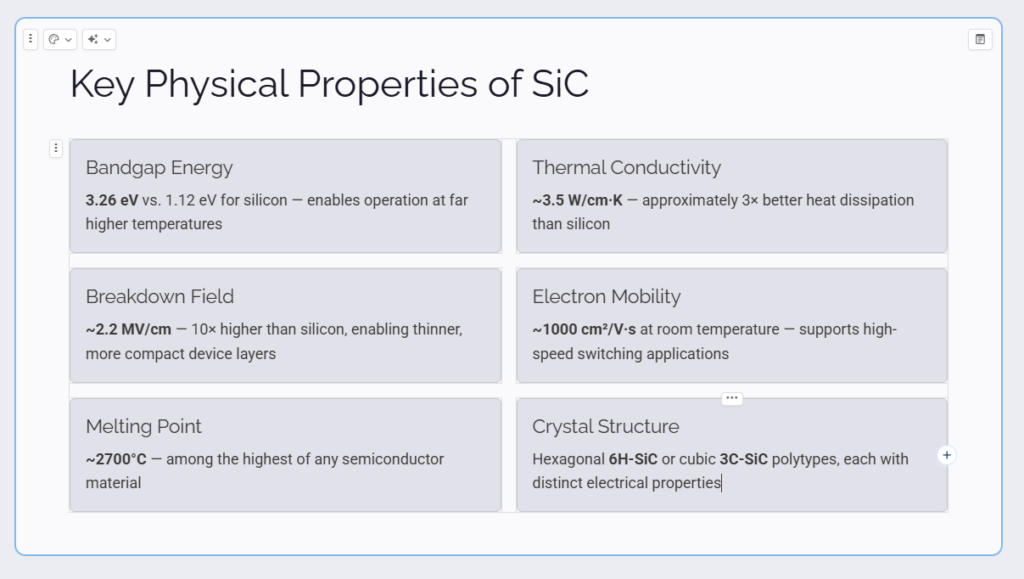
On the slide about the physical properties of SiC, Gamma described the crystal structure using 6H-SiC and 3C-SiC, but it did not mention 4H-SiC.
This immediately showed me one of the biggest limitations of using AI-generated presentations for academic work:
A presentation can look professional while still containing incomplete or oversimplified technical information.
There were other sections where I also felt the wording was quite strong.
For example, the generated presentation described SiC as naturally more radiation tolerant than silicon and connected this directly with spacecraft, satellite, and nuclear applications.
The advantages slide also made broad claims about operation above 600°C and radiation-hard applications.
These statements may be useful for a high-level introductory presentation, but for academic or engineering work I would want to check the conditions, device structure, and original sources before using them.
The automatically generated deck also provided only a very limited source section for the amount of technical information presented.
So my takeaway is:
Gamma is good at creating a convincing first draft, but a convincing slide is not necessarily an academically reliable slide.
I Asked Gamma to Fix the Missing Information
Next, I wanted to see whether correcting the presentation would be difficult.
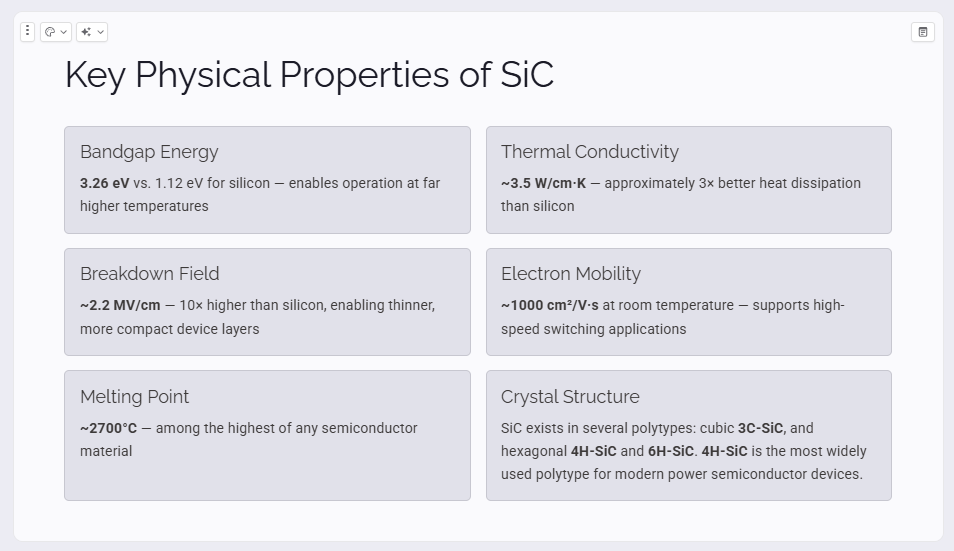
Instead of manually rewriting the slide, I used Gamma’s AI editing feature and asked it to add 4H-SiC to the Crystal Structure section.
Gamma rewrote the section and added 3C-SiC, 4H-SiC, and 6H-SiC while keeping the existing card layout.
This was one of my favorite parts of the experience.
I did not have to redesign the slide or manually adjust the entire layout.
I simply described what information was missing, and Gamma modified the existing content.
For someone who already understands the subject and mainly wants AI to speed up presentation creation, this workflow could be extremely useful.
Then the AI Editing Went Too Far
I performed another experiment.
I asked Gamma:
“Make this explanation easier to understand for undergraduate engineering students.”
Technically, Gamma followed the instruction.
It introduced a simple analogy and gave a more detailed explanation of the different SiC polytypes.
The problem was that the text became much longer.
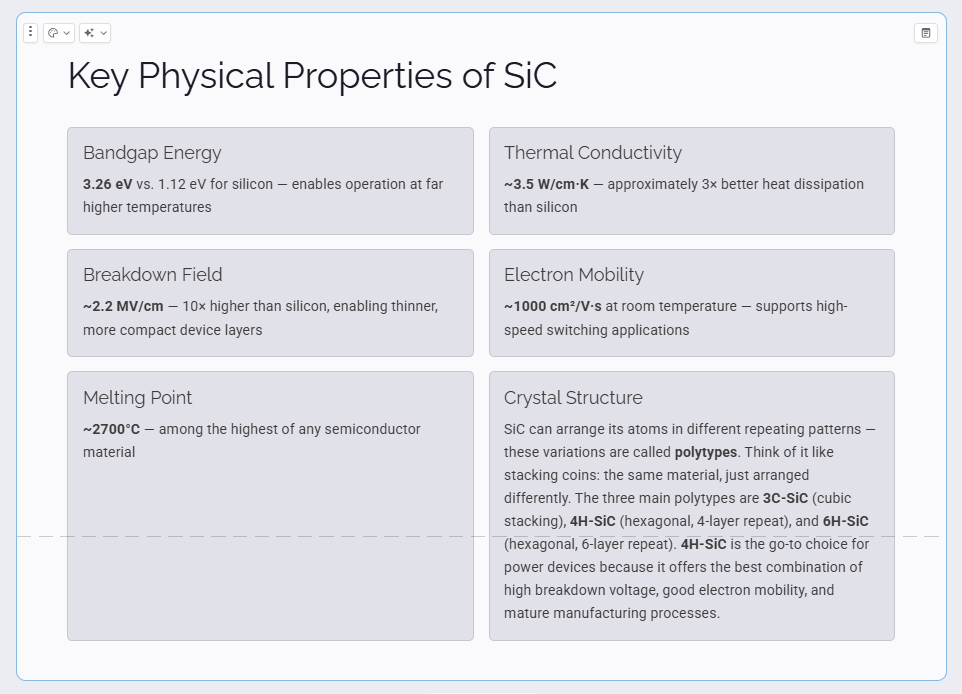
The explanation may have been easier to understand, but it was no longer as suitable for a clean presentation slide.
This was a useful reminder that AI editing still requires human judgment.
An instruction such as “make this easier to understand” can be interpreted as:
add more explanation
rather than:
make this shorter and simpler for a presentation.
If I were doing it again, I would probably use a more specific instruction such as:
“Make this easier for undergraduate students to understand while keeping it under 50 words.”
That would give the AI a clearer constraint.
Can Students Use Gamma for Free?
Yes.
Gamma currently offers a Free plan intended for trying the service and creating simple projects. The Free plan allows up to 10 slides per prompt and supports presentations as well as several other content formats.
The Free plan can also export presentations to PDF, PowerPoint (PPTX), PNG, and Google Slides.
For my test, the free version was enough to understand the basic workflow and create a complete presentation.
This makes it easy for students to try Gamma before deciding whether any paid features are necessary.
Want to try it yourself?
I recommend starting with Gamma’s free plan before deciding whether you need any paid features.
What I Liked
After testing Gamma myself, these were the strongest points.
1. Extremely Fast First Draft
Going from an idea to a complete presentation took very little time.
Instead of starting from zero, I immediately had something that I could review and improve.
2. Clean Presentation Design
I did not need to spend much time choosing layouts.
Gamma automatically organized different types of information in visually appropriate ways.
3. Useful for Brainstorming and Learning
The generated structure can help identify the major topics associated with a subject.
I can imagine using Gamma not only to create slides, but also to get an initial overview of a topic before doing deeper research.
4. AI Editing Is Convenient
Finding a missing point and simply telling Gamma to add it was much faster than manually rebuilding the slide.
This may be Gamma’s most useful feature for people who already know the subject they are presenting.
What I Didn’t Like
Gamma was impressive, but I found several limitations.
1. Technical Information Still Needs Verification
The presentation looked credible even when some technical information was incomplete.
For academic presentations, this is probably the most important limitation.
2. AI Editing Can Become Too Verbose
Asking for a simpler explanation actually produced considerably more text in my test.
You still need to judge whether an AI-generated edit actually improves the slide.
3. Good Design Can Make Weak Information Look Convincing
Because Gamma produces polished slides, it can be easy to assume that the information is equally polished.
Students should separate presentation quality from information quality.
4. It Does Not Replace Subject Knowledge
I found Gamma most useful when I could evaluate what it generated.
If I had known nothing about SiC, I might not have noticed the missing information.
Who Should Use Gamma?
Based on my first test, I think Gamma is particularly useful for:
- Students who want to create presentations faster
- Students who are not confident in slide design
- Graduate students preparing an initial presentation draft
- Researchers who want to organize ideas quickly
- People who want AI help with presentation structure
- Anyone who prefers editing an existing draft instead of starting from a blank slide
I would be more cautious if you plan to use Gamma to generate technical information about a subject you do not understand.
In that situation, use the generated presentation as a starting point, not as your final source.
Is Gamma Good for Academic Presentations?
Yes — if you use it as an assistant rather than an authority.
For a university presentation, I would personally use a workflow like this:
- Ask Gamma to create the initial structure.
- Review every slide.
- Verify important technical claims using reliable sources.
- Correct missing or inaccurate information.
- Use Gamma’s AI editing tools to improve the presentation.
- Perform one final manual review before presenting.
Used this way, Gamma could remove a lot of repetitive presentation work while leaving the important academic decisions to the student.
Final Verdict
My first experience with Gamma was more impressive than I expected.
The biggest surprise was not simply that it could generate slides with AI.
It was that a simple prompt quickly became a presentation that already looked organized and usable.
I also liked that the output could help me understand how a topic might be structured, making Gamma potentially useful as both a presentation tool and an early-stage learning aid.
At the same time, my SiC test showed why human review is still essential.
Gamma missed information that I wanted included, and one AI editing request made the slide more verbose rather than cleaner.
For students, my conclusion is:
Gamma is a very useful tool for creating and improving the first draft of a presentation — but you should still be responsible for the accuracy of the final content.
For technical and academic presentations especially, that distinction matters.
Rating after my first test: 4/5
I plan to continue testing Gamma and other AI tools to see where they genuinely save time — and where human judgment is still necessary.
If you want to see whether Gamma fits your own workflow, you can try the free version first.