
Finding the best webcams for graduate students does not mean spending hundreds of dollars on professional recording equipment.
For most students, a reliable webcam needs to do a few things well: deliver clear video during research meetings, handle everyday lighting conditions, work with common conferencing software, and fit comfortably within a limited budget.
Whether you are attending a virtual seminar, presenting research findings, teaching an online class, or preparing for an internship interview, an external webcam can make your setup more flexible.
The challenge is choosing the right one.
Some inexpensive webcams offer basic 1080p video and fixed focus. Others provide autofocus, higher resolutions, improved microphones, and adjustable framing.
However, paying more does not automatically mean getting a better experience.
Our top recommendation is the Logitech C920x HD Pro, which combines Full HD video, autofocus, and dual microphones with a widely established product design.
For students on tighter budgets, we recommend the EMEET C960 1080P, while the Anker PowerConf C200 and EMEET NOVA 4K offer higher-resolution alternatives.
In this guide, we compare five webcams using manufacturer specifications, Amazon.com pricing, available customer feedback, and the practical needs of graduate students and researchers.
Our goal is to help you choose a webcam that fits your work rather than simply buying the model with the highest resolution.
Amazon Affiliate Disclosure: As an Amazon Associate, GradToolLab earns from qualifying purchases at no additional cost to you.
Editorial Note: This guide is based on published manufacturer specifications, product documentation, publicly available customer feedback, and typical academic workflows. We have not independently performed hands-on testing of these webcams. Amazon.com prices and displayed purchase-volume figures were observed on October 27, 2026, and may change.
Table of Contents
Quick Comparison: Best Webcams for Graduate Students
| Webcam | Best For | Maximum Resolution | Focus | Observed Price |
|---|---|---|---|---|
| Logitech C920x HD Pro | Best Overall | 1080p/30fps | Autofocus | $69.99 |
| EMEET C960 1080P | Best Budget | 1080p/30fps | Fixed focus | $27.07 |
| Anker PowerConf C200 | Best 2K Webcam | 1440p/30fps | Autofocus | $69.99 |
| EMEET NOVA 4K | Best Affordable 4K | 4K/30fps | PDAF autofocus | $39.98 |
| Logitech Brio 101 | Best for Simple Meetings | 1080p/30fps | Fixed focus | $35.99 |
Prices are snapshots from Amazon.com on October 27, 2026. Discounts, configurations, and availability may change.
Our Quick Recommendations
Best Overall: Logitech C920x HD Pro
Choose this webcam if you want an established Full HD model with autofocus and dual microphones for regular academic meetings.
Best Budget: EMEET C960 1080P
Choose this if you want an inexpensive webcam for Zoom, Teams, and online classes without paying for advanced features.
Best 2K Webcam: Anker PowerConf C200
Choose this if you want higher resolution, autofocus, and adjustable framing for a permanent desktop setup.
Best Affordable 4K: EMEET NOVA 4K
Choose this if you want 4K recording capability and autofocus without entering the premium webcam price range.
Best for Simple Meetings: Logitech Brio 101
Choose this if you prefer a straightforward Logitech webcam with a built-in privacy shutter and minimal setup requirements.
1. Logitech C920x HD Pro
BEST OVERALL
Best for: Graduate students and researchers who want a dependable Full HD webcam with autofocus, dual microphones, and practical features for frequent video meetings.
Pros
- Full HD 1080p video at 30fps
- Autofocus for changing subject distances
- Dual integrated microphones
- Automatic light correction
- Established C920-series design
- USB-A plug-and-play connection
- Compatible with common conferencing platforms
- Universal mounting clip
- Suitable for laptop and desktop workstations
- Strong Amazon customer-review history
Cons
- More expensive than basic 1080p webcams
- No 2K or 4K recording
- Maximum Full HD frame rate is 30fps
- No integrated privacy shutter in the standard C920x design
- Fixed field of view rather than multiple optical viewing angles
- Older design compared with newer webcam models
The Logitech C920x HD Pro is our overall recommendation because it provides a balanced combination of video resolution, autofocus, microphone functionality, and straightforward usability.
Not every graduate student needs 4K recording.
For ordinary research meetings, the most important requirement is often a camera that produces a consistently usable image without requiring complicated setup.
The C920x focuses on exactly that type of experience.
It supports Full HD 1920 × 1080 video at up to 30 frames per second.
This is sufficient for many common video conferencing situations, including laboratory meetings, online seminars, and research discussions.
The camera also includes autofocus.
This is an important difference compared with some cheaper webcams.
A fixed-focus camera is designed to keep objects within a particular distance range reasonably sharp.
Autofocus can adjust when the distance between the subject and camera changes.
For example, a graduate student may lean closer to the monitor while reading a research paper, then sit back while presenting results.
Autofocus helps accommodate these changes without requiring manual focus adjustments.
The C920x also includes dual microphones.
Having microphones built into the webcam simplifies the overall setup.
Instead of connecting multiple devices, students can use one USB peripheral for both video and basic voice communication.
However, integrated microphones are not necessarily the best option for recording lectures or producing high-quality narration.
For more demanding audio work, we recommend considering a dedicated microphone.
Our best USB microphones for graduate students guide compares microphones for research presentations, online classes, and recording.
Another advantage is the straightforward connection.
The C920x uses USB-A, which remains common on desktop computers, docking stations, and many laptops.
Users with USB-C-only laptops may need an adapter or hub.
However, the camera does not require a specialized recording interface.
This makes it practical for graduate students who use their computers for multiple activities.
A researcher may spend the morning analyzing data, attend an online meeting in the afternoon, and participate in an evening seminar.
The webcam can remain mounted above the display without interfering with these activities.
The main drawback is its price.
At the observed Amazon.com price of $69.99, the C920x costs considerably more than the EMEET C960 or Logitech Brio 101.
It also costs the same as the Anker PowerConf C200, which offers a higher maximum resolution.
Therefore, the C920x is not automatically the best value based on specifications alone.
Its appeal lies in the combination of an established product family, autofocus, and straightforward Full HD video communication.
We recommend it for users who prioritize a conventional, well-established webcam rather than seeking the highest resolution for the lowest price.
The Logitech C920x HD Pro is suitable for graduate students who participate in frequent online communication.
We particularly recommend it for:
- Weekly laboratory meetings
- Online research seminars
- Virtual internship interviews
- Remote thesis discussions
- Collaborative research meetings
- Teaching assistant office hours
- Students using external monitors
- Researchers who prefer a conventional USB webcam
Consider a graduate student who works with an external monitor for most of the day.
A built-in laptop webcam may sit too low or at an inconvenient angle.
Installing the C920x above an external display allows the user to maintain a more natural camera position.
This can be especially useful during longer meetings.
The webcam also makes sense for users who do not want to manage advanced camera settings.
Its core features are intended for straightforward video communication.
However, students primarily interested in recording higher-resolution video may prefer the Anker C200 or EMEET NOVA 4K.
Likewise, students who only attend occasional online meetings may find a cheaper 1080p webcam sufficient.
- Product: Logitech C920x HD Pro
- Type: Full HD USB webcam
- Maximum resolution: 1920 × 1080
- Maximum Full HD frame rate: 30fps
- Focus: Autofocus
- Field of view: Approximately 78°
- Microphones: Dual integrated microphones
- Light correction: Automatic
- Connection: USB-A
- Cable: Attached USB cable
- Mounting: Universal clip
- Tripod compatibility: Supported through compatible mounting hardware
- Privacy shutter: Not included in standard C920x design
- Recommended applications: Zoom, Microsoft Teams, Google Meet, and other compatible video applications
- Observed Amazon.com price: $69.99
- Amazon rating observed: 4.6/5
- Displayed monthly purchases: 10K+
The C920x should not be confused with every other product in the C920 family.
Models such as the C920s may include different accessories, including privacy covers.
Before purchasing, verify the exact model and configuration shown in the Amazon listing.
2. EMEET C960 1080P
BEST BUDGET
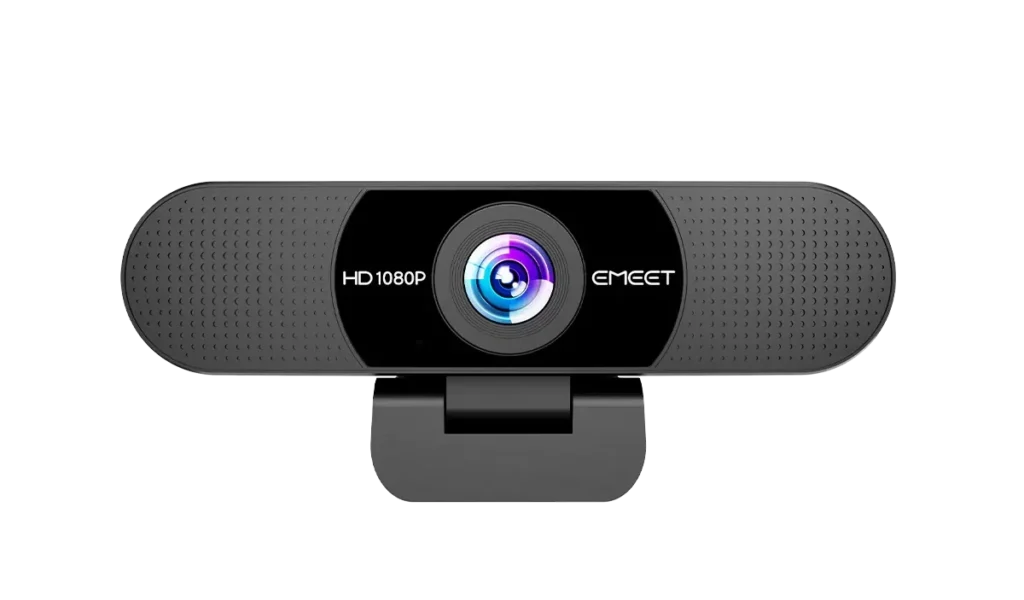
Best for: Budget-conscious graduate students who need an affordable Full HD webcam for everyday online classes, laboratory meetings, and occasional video interviews.
Pros
- Very affordable price
- Full HD 1080p video at 30fps
- Wide 90° field of view
- Dual built-in microphones
- Automatic light correction
- Simple USB connection
- Physical privacy cover
- Plug-and-play operation
- Suitable for common video conferencing platforms
- Strong Amazon purchase-volume history
Cons
- Fixed focus rather than autofocus
- Wide field of view may reveal more background than desired
- Limited to 1080p/30fps
- Fewer advanced framing features
- No automatic subject tracking
- Not ideal for frequent close-up demonstrations
- Basic construction and software feature set
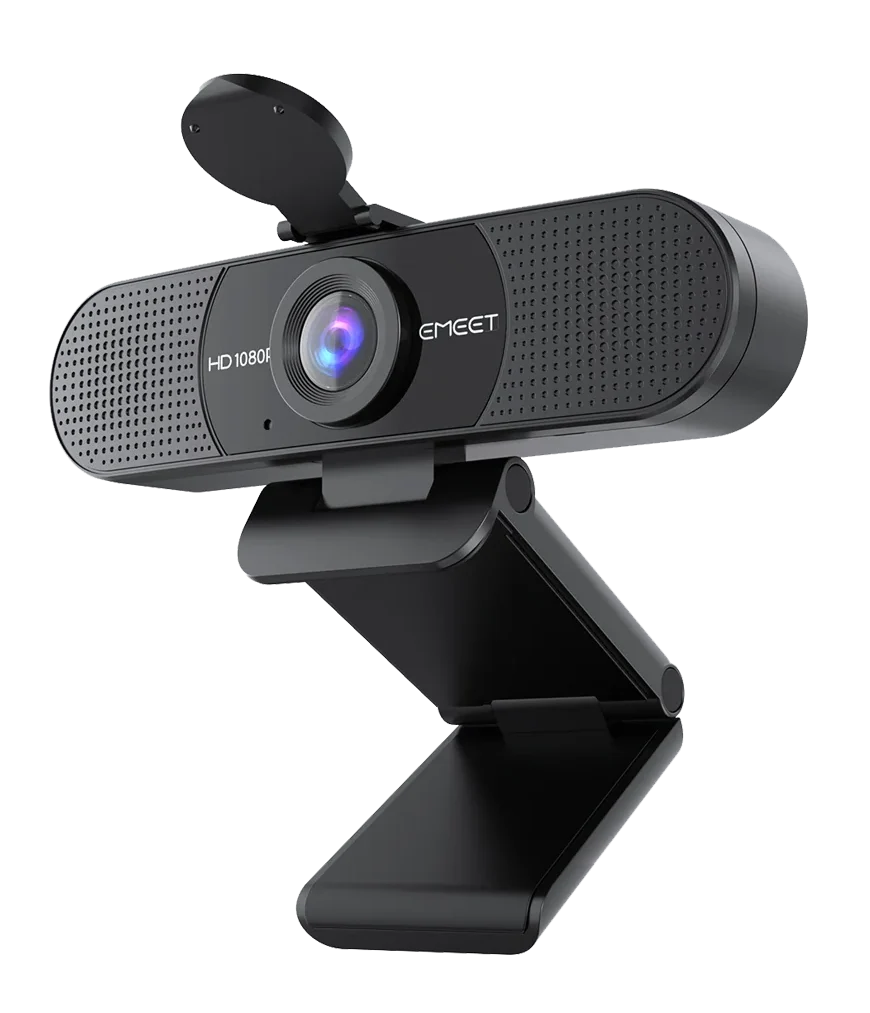
The EMEET C960 1080P is our budget recommendation because it provides the essential features of an external webcam at a very low purchase price.
At the time of our Amazon.com check, the selected 1080p version cost $27.07.
This makes it the least expensive product in our five-webcam comparison.
For graduate students trying to manage equipment expenses, that price is attractive.
Not everyone needs a sophisticated webcam.
Some students primarily attend occasional Zoom meetings, remote lectures, or online discussions.
In these situations, an inexpensive Full HD webcam may be all that is necessary.
The C960 supports 1920 × 1080 video at 30fps.
That is the same maximum resolution and frame rate as several more expensive meeting-oriented webcams.
However, resolution alone does not establish equivalent image quality.
Sensor performance, autofocus, lighting correction, and image processing also matter.
One of the C960’s main trade-offs is fixed focus.
Unlike the Logitech C920x or Anker C200, the C960 does not automatically adjust focus as the subject moves closer or farther away.
Instead, it is designed to keep subjects reasonably clear within a specified distance range.
This approach works well when the user remains seated at a consistent distance.
For example, a graduate student attending an online seminar may sit approximately the same distance from the monitor throughout the meeting.
In this situation, fixed focus is unlikely to be a major inconvenience.
However, someone who frequently holds small objects close to the camera may prefer autofocus.
Another important feature is the C960’s 90° field of view.
This is relatively wide for a basic personal webcam.
A wider view can help capture multiple participants or more of the surrounding workspace.
For example, two students sharing a computer during a remote meeting may benefit from the additional framing space.
However, a wide field of view is not always preferable.
Students working from small bedrooms or shared accommodation may prefer a narrower view that excludes unnecessary background details.
The C960 also includes dual microphones.
These allow users to participate in meetings without purchasing a separate microphone immediately.
For ordinary conversation, that may be sufficient.
However, we would not recommend relying on integrated webcam microphones for professional-quality narration without first assessing their performance.
The C960 also supports automatic light correction.
This is useful because graduate students often work in environments with imperfect lighting.
A desk may be positioned away from a window, or an evening meeting may take place under relatively dim room lighting.
Automatic correction can help compensate for certain exposure problems.
However, it cannot completely replace appropriate illumination.
For users who want a more consistent image, our best video conference lights for graduate students guide covers dedicated lighting options.
Overall, the C960 is attractive because it offers a practical entry point into external webcam equipment.
It does not attempt to provide premium features.
Instead, it focuses on affordable Full HD video communication.
We recommend the EMEET C960 1080P for students who want to improve their video setup while spending as little as possible.
It is especially appropriate for:
- Students attending occasional Zoom meetings
- Graduate students with limited equipment budgets
- Online lecture participants
- Students using older desktop computers
- Basic research group meetings
- Shared study spaces
- Users who do not need autofocus
- Students purchasing their first external webcam
The C960 is particularly appealing when video communication is only a small part of the overall academic workflow.
A researcher who spends most of the day programming or analyzing data may not need an expensive webcam.
If video meetings happen only once or twice a week, spending more than $100 on a camera may provide limited additional value.
However, users who regularly record presentations or demonstrate physical materials should consider a webcam with autofocus.
- Product: EMEET C960 1080P
- Type: Full HD USB webcam
- Maximum resolution: 1920 × 1080
- Maximum frame rate: 30fps
- Focus: Fixed focus
- Field of view: 90°
- Microphones: Dual integrated microphones
- Light correction: Automatic
- Privacy cover: Physical cover
- Connection: USB-A
- Adapter: USB-A-to-USB-C adapter listed with the selected 2025 configuration
- Mounting: Adjustable monitor clip
- Tripod compatibility: Supported
- Compatible applications: Zoom, Teams, Google Meet, and other supported platforms
- Observed Amazon.com price: $27.07
- Amazon rating observed: 4.4/5
- Displayed monthly purchases: 10K+
Important: This recommendation refers to the EMEET C960 1080P version.
It should not be confused with the C960 2K or C960 4K models, which have different specifications.
Always confirm the resolution and selected configuration before purchasing.
3. Anker PowerConf C200
BEST 2K WEBCAM
Best for: Graduate students who want higher-resolution video, autofocus, adjustable framing, and a compact webcam for frequent online meetings.
Pros
- 2560 × 1440 maximum resolution
- Autofocus
- Adjustable 65°, 78°, and 95° field of view
- Dual integrated microphones
- Noise reduction and automatic gain control
- Integrated privacy cover
- Compact design
- AnkerWork software
- Suitable for permanent desktop setups
- Competitive price for a 2K webcam
Cons
- More expensive than basic 1080p alternatives
- No automatic subject tracking comparable to Logitech RightSight
- No dedicated Show Mode
- Higher resolution may be reduced by conferencing software
- Some adjustments require AnkerWork
- Camera performance depends on lighting conditions
The Anker PowerConf C200 is our recommendation for students who want more flexibility than a conventional 1080p webcam provides.
It supports a maximum resolution of 2560 × 1440.
This gives it approximately 78% more pixels than standard Full HD 1920 × 1080 video.
For students who record presentations or create educational content, the additional resolution can be useful.
However, higher resolution is not always visible during an ordinary video meeting.
Video conferencing platforms may reduce transmitted video quality depending on bandwidth, software settings, and account limitations.
Therefore, we recommend considering the C200 for its overall feature set rather than resolution alone.
One of its important advantages is autofocus.
This allows the camera to adjust focus when the subject’s distance changes.
For example, a researcher may lean toward the webcam while discussing a result or move backward to show a diagram.
Autofocus provides more flexibility than a fixed-focus design.
The C200 also supports adjustable framing.
Through AnkerWork software, users can select 65°, 78°, or 95° fields of view.
The narrowest option is useful when the user wants a tighter composition.
This may be attractive for online interviews, thesis discussions, or meetings where the background should remain less visible.
The wider setting is useful when several participants need to fit within the frame.
It can also help when the camera is mounted close to the speaker.
The C200 additionally includes dual microphones with noise reduction and automatic gain control.
These features are intended to improve speech capture during meetings.
However, microphone performance will still depend on the recording environment.
A quiet room generally produces better results than a noisy shared workspace.
Another practical feature is the integrated privacy cover.
Students who leave the webcam permanently connected can physically block the lens between meetings.
The C200’s compact form factor also makes it attractive for smaller workstations.
At the observed price of $69.99, it costs the same as the Logitech C920x HD Pro.
That creates an interesting choice.
The C920x offers a conventional, established Full HD webcam design.
The C200 offers higher maximum resolution and more flexible field-of-view settings.
For users who primarily value resolution and software-controlled framing, we think the Anker is the more attractive option.
However, we would not claim that it automatically produces better image quality without controlled testing.
For a more detailed comparison of Anker’s features against a premium Logitech webcam, see our Logitech Brio 500 vs Anker PowerConf C200 comparison.
We recommend the Anker PowerConf C200 for students who regularly use video communication and want additional flexibility.
Suitable users include:
- Researchers recording presentations
- Graduate students attending frequent meetings
- Students preparing for virtual interviews
- Teaching assistants creating instructional materials
- Users with compact desk setups
- Students who prefer adjustable framing
- Researchers using external monitors
- Users who want autofocus without premium pricing
For example, a graduate student who frequently records short presentation videos may appreciate the additional resolution.
A student participating in online interviews may prefer the narrower field-of-view setting.
The C200 can support both workflows without requiring a more expensive premium webcam.
However, users who rarely attend video meetings may not need these additional capabilities.
- Product: Anker PowerConf C200
- Type: 2K USB webcam
- Maximum resolution: 2560 × 1440
- 2K frame rate: Up to 30fps
- Focus: Autofocus
- Field of view: 65°, 78°, 95°
- Microphones: Dual integrated microphones
- Audio processing: Noise reduction and automatic gain control
- Privacy cover: Integrated
- Software: AnkerWork
- Connection: USB-C on the camera
- Mounting: Adjustable clip
- Tripod compatibility: Supported
- Compatible operating systems: Supported Windows and macOS configurations
- Observed Amazon.com price: $69.99
- Amazon rating observed: 4.4/5
- Displayed monthly purchases: 4K+
Before purchasing, confirm compatibility with your computer and the AnkerWork features you intend to use.
4. EMEET NOVA 4K
BEST AFFORDABLE 4K
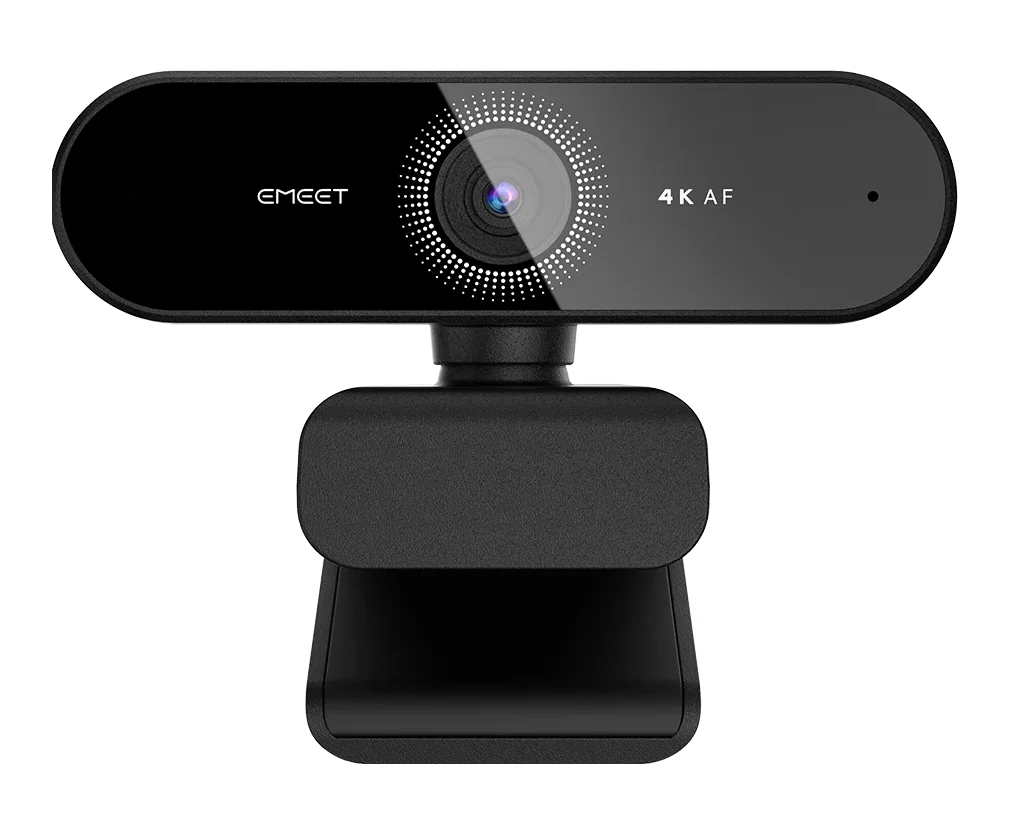
Best for: Graduate students who want an affordable 4K webcam with autofocus for recording presentations, tutorials, and academic video content.
Pros
- 4K Ultra HD video at up to 30fps
- 1080p recording at up to 60fps
- PDAF autofocus
- 73° field of view
- Dual integrated microphones
- Physical privacy cover
- USB plug-and-play connectivity
- EMEETLINK software support
- Tripod-compatible mounting
- Competitive pricing for a 4K webcam
Cons
- More resolution than many video meetings require
- 4K recording creates larger files
- Higher resolution does not guarantee better low-light performance
- No automatic subject-tracking gimbal
- Video conferencing applications may not transmit 4K
- Actual recording performance depends on computer and software settings
- Promotional pricing may change
The EMEET NOVA 4K is one of the most interesting webcams in this comparison.
It provides 4K recording capability at a price that is considerably lower than many premium webcams.
At the time of our Amazon.com check, the selected NOVA 4K configuration cost $39.98.
This was a promotional price, so it should not be treated as a guaranteed long-term offer.
Even so, the combination of 4K resolution and autofocus makes the product worth considering.
The webcam supports a maximum resolution of 3840 × 2160.
Compared with standard 1080p video, 4K contains four times as many pixels.
This can provide useful flexibility during local recording.
For example, a graduate student creating a tutorial may want to crop the recorded image during editing.
Starting with a higher-resolution recording can preserve more detail when cropping.
Similarly, researchers creating educational content may prefer having additional resolution available for future use.
However, this does not mean that everyone should record in 4K.
Higher-resolution recordings use more storage space and can require more processing resources.
For ordinary Zoom or Teams meetings, the additional pixels may offer limited practical benefits.
Another important advantage is PDAF autofocus.
PDAF stands for phase-detection autofocus.
It is designed to determine the direction of focus adjustment efficiently.
For users who move slightly during recording or change their distance from the camera, autofocus can be helpful.
This creates a meaningful distinction between the NOVA 4K and inexpensive fixed-focus webcams.
The NOVA 4K also supports Full HD recording at up to 60fps.
This offers another recording option.
Users can prioritize maximum resolution with 4K/30fps or choose smoother Full HD footage at 60fps when supported by their recording software.
For students recording demonstrations, that flexibility may be valuable.
The camera also has a 73° field of view.
This is narrower than the 90° field of view of the EMEET C960.
For individual video calls, a narrower view can help keep attention on the speaker while showing less of the surrounding room.
However, it may be less convenient for group meetings.
The NOVA 4K includes dual microphones and a physical privacy cover.
These features make it suitable for everyday meetings as well as recording.
EMEETLINK software provides additional configuration options for supported systems.
The main limitation is that 4K capability does not establish superior overall image quality.
A well-exposed 1080p image can look better than poorly exposed 4K footage.
Sensor characteristics, lighting, autofocus behavior, and processing remain important.
Because we have not independently compared these webcams, we cannot verify that the NOVA 4K produces the best-looking footage.
Nevertheless, its specifications are compelling at the observed price.
We recommend the EMEET NOVA 4K for students who want higher-resolution recording capabilities without paying premium webcam prices.
It is especially relevant for:
- Students recording research presentations
- Teaching assistants producing tutorial videos
- Researchers creating educational content
- Graduate students recording demonstrations
- Users who edit or crop recorded footage
- Students who want autofocus
- Budget-conscious users interested in 4K
- Researchers building a multipurpose workstation
For example, a graduate student creating a narrated presentation may want to record a small camera view for later editing.
The additional resolution can provide flexibility when preparing the final video.
However, users who only attend occasional meetings may find the EMEET C960 more economical.
- Product: EMEET NOVA 4K
- Type: Ultra HD USB webcam
- Maximum resolution: 3840 × 2160
- 4K frame rate: Up to 30fps
- 1080p frame rate: Up to 60fps
- Focus: PDAF autofocus
- Field of view: 73°
- Microphones: Dual integrated microphones
- Privacy cover: Physical cover
- Software: EMEETLINK
- Connection: USB-A
- Mounting: Adjustable monitor clip
- Rotation: 360° camera rotation
- Tripod compatibility: 1/4-inch mounting thread
- Compatible systems: Supported Windows and macOS configurations
- Observed Amazon.com price: $39.98
- Amazon rating observed: 4.5/5
- Displayed monthly purchases: 2K+
Important: EMEET sells several similarly named products.
The NOVA 4K is different from the standard EMEET NOVA 1080P and the NOVA 4K Dual.
Make sure the selected product is the correct single-camera NOVA 4K configuration.
5. Logitech Brio 101
BEST FOR SIMPLE MEETINGS
Best for: Graduate students who prefer an uncomplicated Logitech webcam with Full HD video, automatic lighting adjustment, and a built-in privacy shutter.
Pros
- Affordable Logitech webcam
- Full HD 1080p at 30fps
- Simple USB-A connection
- Automatic light balancing
- Integrated privacy shutter
- Built-in microphone
- Compact design
- Easy installation
- Suitable for everyday meetings
- Strong Amazon purchase-volume history
Cons
- Fixed focus
- No 2K or 4K recording
- No automatic framing
- No advanced presentation features
- Single built-in microphone
- Less flexible than higher-end Logitech models
- Relatively basic camera controls
The Logitech Brio 101 is our recommendation for students who want a straightforward webcam from an established peripheral manufacturer.
Not every student needs autofocus, 4K resolution, or advanced camera software.
Sometimes the most practical option is a webcam that can remain attached to a monitor and work whenever an online meeting begins.
The Brio 101 focuses on that type of simplicity.
It provides Full HD 1080p video at up to 30fps.
For common academic activities, this is sufficient.
A graduate student joining a research group meeting usually does not need high-resolution recording features.
The camera simply needs to show the speaker clearly.
The Brio 101 also includes automatic light balancing.
This helps the webcam adapt to different lighting conditions.
For example, a student might attend meetings during the afternoon and evening.
The amount of natural light entering the room may change considerably.
Automatic correction is useful in these situations, although good external lighting can still improve the result.
The Brio 101 uses fixed focus.
This is one of its main limitations.
Unlike the Logitech C920x, Anker C200, or EMEET NOVA 4K, it does not automatically adjust focus for changing subject distances.
However, fixed focus can be sufficient when the user remains seated at a consistent distance.
For many ordinary online meetings, that is exactly how the webcam will be used.
Another useful feature is the integrated privacy shutter.
This allows users to physically block the lens when the webcam is not needed.
For students living in shared accommodation, a physical cover provides an additional sense of control over their equipment.
The Brio 101 also includes a built-in microphone.
This reduces the number of accessories required for basic video communication.
However, its single-microphone arrangement is relatively simple compared with some dual-microphone webcams.
We would not assume that it provides equivalent audio performance without independent testing.
At the observed Amazon.com price of $35.99, the Brio 101 is more expensive than the EMEET C960.
That raises an obvious question.
Why should someone choose the Logitech instead?
The answer is not that the Brio 101 has better specifications.
In fact, the C960 offers a wider field of view and dual microphones at a lower observed price.
Instead, the Brio 101 is attractive for students who prefer Logitech’s straightforward design and want a simple webcam without unnecessary features.
We recommend choosing it based on those preferences rather than assuming the higher price guarantees better image quality.
The Logitech Brio 101 is suitable for students who want a basic external webcam for everyday communication.
It is particularly relevant for:
- Online graduate seminars
- Occasional research meetings
- Virtual interviews
- Students using desktop computers
- Simple home office setups
- Users who prefer Logitech peripherals
- Students who want a built-in privacy shutter
- Users who do not need advanced video features
For someone who mainly uses a webcam while seated at a desk, the Brio 101 offers a straightforward solution.
However, we recommend considering the Logitech C920x if autofocus is important.
Similarly, students seeking the lowest price should compare the Brio 101 with the EMEET C960.
- Product: Logitech Brio 101
- Type: Full HD USB webcam
- Maximum resolution: 1920 × 1080
- Maximum frame rate: 30fps
- Focus: Fixed focus
- Field of view: Approximately 58°
- Microphone: Integrated mono microphone
- Light correction: Automatic light balancing
- Privacy shutter: Integrated
- Connection: USB-A
- Mounting: Integrated clip
- Compatible applications: Common conferencing software
- Observed Amazon.com price: $35.99
- Amazon rating observed: 4.4/5
- Displayed monthly purchases: 10K+
The Brio 101 belongs to Logitech’s entry-level webcam family.
Before purchasing, confirm the exact model and included accessories because regional Brio 100-series naming can differ.
What to Look for in the Best Webcams for Graduate Students
Choosing a webcam requires more than comparing the advertised resolution.
Graduate students often use their computers for several activities.
A single workstation may serve as a research environment, presentation setup, communication system, and personal computer.
The ideal webcam should fit those activities without creating unnecessary expense.
Video Resolution: Is 1080p Enough?
For most online meetings, 1080p is sufficient.
Full HD video provides enough resolution for a clear head-and-shoulders view under appropriate lighting conditions.
However, 2K and 4K webcams offer additional possibilities.
Higher resolution can be useful when recording educational content.
For example, a student may record a presentation and later crop the video during editing.
More pixels can preserve additional detail after cropping.
However, the conferencing software may not transmit the camera’s maximum resolution.
Therefore, paying more for resolution alone does not guarantee better video calls.
Autofocus vs Fixed Focus
Autofocus is one of the most useful features to consider.
A fixed-focus webcam works best when the subject remains within its intended distance range.
This can be perfectly adequate for ordinary desk-based meetings.
Autofocus provides additional flexibility.
If the user leans forward or moves backward, the webcam can adjust its focus.
This is particularly useful for recorded presentations or demonstrations.
Among our recommendations, the Logitech C920x, Anker C200, and EMEET NOVA 4K offer autofocus.
The EMEET C960 1080P and Logitech Brio 101 use fixed focus.
Frame Rate: 30fps vs 60fps
Frame rate describes how many images a camera captures each second.
For most online meetings, 30fps is adequate.
However, 60fps can make movement appear smoother.
This may be useful for students recording tutorials or demonstrations.
The EMEET NOVA 4K supports 1080p recording at up to 60fps.
However, higher frame rates may not always be supported by the selected conferencing or recording application.
Field of View
Field of view determines how much of the surrounding area the webcam captures.
A narrow field of view is useful for individual meetings.
It keeps attention on the speaker and limits the amount of background visible.
A wider field of view is useful for shared workspaces or group discussions.
The EMEET C960 offers a wide 90° field of view.
The Anker PowerConf C200 allows users to select between different viewing angles.
Before choosing, consider where the webcam will be mounted and how far away you normally sit.
Low-Light Performance
Lighting can significantly affect webcam image quality.
Graduate students may attend evening seminars, participate in international meetings, or work in rooms without ideal lighting.
Automatic exposure and light correction can help.
However, these features cannot fully compensate for very poor lighting.
Positioning a lamp in front of the user often improves results.
Avoid placing a bright window directly behind the subject whenever possible.
For additional workstation lighting options, see our best video conference lights for graduate students.
Built-In Microphones
Most modern webcams include microphones.
For occasional meetings, these can provide a convenient all-in-one solution.
However, integrated microphones are usually positioned relatively far from the speaker.
A dedicated microphone can be placed closer to the mouth, providing more control over voice capture.
This is particularly useful for recording lectures, tutorials, or narrated research presentations.
For students building a more advanced audio setup, our best microphone boom arms for graduate students guide explores ways to position a dedicated microphone without occupying excessive desk space.
Privacy Protection
A physical privacy shutter is a useful feature for a permanently installed webcam.
It allows the lens to be blocked when the camera is not needed.
Some webcams include integrated covers, while others require separate accessories.
Before purchasing, confirm whether the selected product includes a physical shutter.
Connection and Compatibility
Many webcams use USB-A connections.
Others use USB-C.
Neither is automatically better for every computer.
Students using modern laptops with only USB-C ports may require an adapter for USB-A webcams.
Desktop computers and docking stations often provide several USB-A ports.
Check your computer’s available connections before purchasing.
If you need additional ports for cameras, microphones, external storage, or other equipment, our best USB-C hubs for graduate students guide covers additional connectivity options.
Which Webcam Is Best for Different Graduate-Student Workflows?
Different academic activities create different requirements.
| Academic Use Case | Our Recommendation |
|---|---|
| Everyday research meetings | Logitech C920x |
| Lowest equipment budget | EMEET C960 1080P |
| Higher-resolution recording | Anker PowerConf C200 |
| Affordable 4K content creation | EMEET NOVA 4K |
| Simple online classes | Logitech Brio 101 |
| Autofocus at an affordable price | EMEET NOVA 4K |
| Shared desk or wider framing | EMEET C960 1080P |
| Adjustable field of view | Anker PowerConf C200 |
| Conventional Full HD setup | Logitech C920x |
| Occasional Zoom calls | EMEET C960 1080P |
For Online Research Meetings
We recommend the Logitech C920x HD Pro.
It provides autofocus, dual microphones, and Full HD video.
These features make it a practical choice for students who attend frequent meetings.
However, students on limited budgets can choose the EMEET C960 without sacrificing the basic 1080p resolution.
For Graduate Students on a Budget
We recommend the EMEET C960 1080P.
At the observed $27.07 price, it offers a low-cost entry point.
Its fixed-focus design is a limitation, but that may not matter for ordinary desk-based communication.
For Recorded Research Presentations
We recommend considering the Anker PowerConf C200.
Its 2K resolution and autofocus provide flexibility for students recording presentations.
The adjustable field of view is another useful feature.
For Educational Videos and Tutorials
We recommend the EMEET NOVA 4K.
Its 4K recording capability and autofocus make it attractive for students creating instructional content.
However, users should consider storage requirements and whether their recording software supports the desired resolution.
For Occasional Online Classes
We recommend either the Logitech Brio 101 or EMEET C960.
Both provide Full HD video at relatively low prices.
The C960 is the more economical option at the observed prices.
The Brio 101 is an alternative for users who prefer a simple Logitech webcam.
Frequently Asked Questions
What Is the Best Webcam for Graduate Students in 2026?
We recommend the Logitech C920x HD Pro as our best overall choice.
It offers Full HD video, autofocus, and dual microphones in an established webcam design.
However, the best option depends on your budget and academic workflow.
Students who want a cheaper webcam should consider the EMEET C960 1080P.
Is a 4K Webcam Necessary for Graduate School?
No.
Most graduate students do not need 4K video for ordinary online meetings.
A good 1080p webcam is usually sufficient.
However, 4K can be useful when recording tutorials or presentations that may be edited later.
Is the Logitech C920x Better Than the Brio 101?
The C920x offers autofocus and dual microphones, making it more flexible for users who move during meetings.
The Brio 101 is a simpler and less expensive option.
We recommend the C920x for frequent video communication and the Brio 101 for basic meetings.
Is the EMEET C960 Good for Zoom Meetings?
The EMEET C960 1080P is suitable for ordinary Zoom meetings.
It provides Full HD resolution, a wide field of view, and integrated microphones.
However, it uses fixed focus rather than autofocus.
Does the Anker PowerConf C200 Support 2K Video?
Yes.
The Anker PowerConf C200 supports a maximum resolution of 2560 × 1440.
However, conferencing software may reduce the transmitted video resolution.
Is the EMEET NOVA 4K Worth Buying?
The NOVA 4K is attractive for students who want high-resolution recording at a relatively low price.
It offers 4K video and PDAF autofocus.
However, 4K resolution alone does not guarantee better image quality in every environment.
Which Webcam Is Best for Low-Light Conditions?
All five webcams offer different approaches to image capture and exposure.
However, we have not independently compared their low-light performance.
Rather than declaring a winner without testing, we recommend improving your lighting setup and choosing a webcam based on the other features you need.
Do Graduate Students Need an External Webcam?
Not necessarily.
A built-in laptop webcam may be sufficient for occasional meetings.
However, an external webcam provides more flexibility when using external monitors or adjusting camera position.
It can also offer additional features such as autofocus or higher-resolution recording.
Are Webcam Microphones Good Enough for Presentations?
Built-in microphones can be sufficient for ordinary video meetings.
However, students recording lectures, tutorials, or professional presentations may benefit from a dedicated USB microphone.
Microphone placement and room acoustics can significantly affect recorded speech quality.
Which Webcam Has the Best Value?
For students seeking the lowest price, we recommend the EMEET C960 1080P.
For students who want additional recording features without spending much more, the EMEET NOVA 4K is also worth considering.
The better value depends on whether you need autofocus and higher-resolution recording.
Final Verdict: The Best Webcams for Graduate Students in 2026
Choosing the best webcam for graduate school does not require purchasing the most expensive model.
The ideal webcam should match your typical activities, available budget, and recording environment.
After comparing these five products, we recommend the Logitech C920x HD Pro as our best overall choice.
It provides a practical combination of Full HD video, autofocus, and integrated microphones for frequent academic communication.
For students seeking the lowest price, the EMEET C960 1080P is our budget recommendation.
Its straightforward design provides the essential features needed for everyday online meetings.
The Anker PowerConf C200 is our preferred 2K option, particularly for users who want autofocus and adjustable framing.
The EMEET NOVA 4K offers compelling recording capabilities at an unusually accessible price, making it attractive for tutorials and educational content.
Finally, the Logitech Brio 101 is a sensible option for students who prefer a simple Full HD webcam with minimal setup requirements.
Our final recommendation: Start by deciding whether you need autofocus, higher-resolution recording, or simply a reliable camera for meetings.
For most graduate students, a practical webcam combined with appropriate lighting and clear audio will be more useful than paying extra for features they rarely use.
Choose the model that supports your actual research and study workflow—and spend the remaining budget on equipment that makes your overall workstation more comfortable and productive.

