
Finding the best USB microphones for graduate students depends on how you plan to use them for meetings, presentations, interviews, or recording.
For graduate students, that could mean a remote research meeting, an online interview, a recorded presentation, teaching a class, conducting an interview, or creating educational content. Laptop microphones are convenient, but they often pick up keyboard noise, room echo, and sound from farther away.
If video quality matters too, see our guide to the best webcams for graduate students.
A dedicated USB microphone gives you more control without requiring an audio interface or complicated recording setup.
For this guide, I compared five microphones across different price ranges, focusing on voice clarity, ease of setup, desk space, background-noise handling, monitoring, connectivity, and features that are actually useful for graduate students.
Disclosure: This post contains affiliate links. If you buy through one of these links, GradToolLab may earn a commission at no additional cost to you.
Quick Comparison
| Product | Best For | Microphone Type | Connection | Standout Feature |
|---|---|---|---|---|
| Elgato Wave Neo | Best Overall | Condenser | USB-C | 24-bit/96kHz, headphone monitoring |
| HyperX SoloCast 2 | Best Budget | Condenser | USB | Built-in shock mount and pop filter |
| RØDE NT-USB Mini | Best Compact | Condenser | USB-C | Magnetic stand and zero-latency monitoring |
| FIFINE K688 | Best USB/XLR Option | Dynamic | USB + XLR | Upgrade path to an audio interface |
| Shure MV6 | Best Premium | Dynamic | USB-C | Auto Level and real-time noise reduction |
1. Elgato Wave Neo — Best Overall
The Elgato Wave Neo offers one of the most balanced combinations of simplicity, recording quality, and useful desktop features in this comparison.
It is a cardioid condenser microphone that supports 24-bit recording at 48 or 96kHz, with a 20Hz–20kHz frequency response and a maximum SPL of 120dB. It connects digitally through USB-C and also includes a 3.5mm headphone output for monitoring.
That combination makes it particularly convenient for graduate students who need one microphone for several different tasks. You could use it for Zoom meetings during the week and then record a presentation, tutorial, or research explanation without changing your entire setup.
A touch-sensitive mute control is built into the microphone: the LED is white when the microphone is active and red when muted. Elgato also supports Wave Neo through its Wave Link software, which gives users more control over audio routing and processing.
The included riser is another practical detail. You can use the microphone at a taller position or remove the riser for a lower-profile setup. It also supports several common mounting threads if you eventually move it to a microphone arm.
The main limitation is that it is still a condenser microphone. Like other sensitive condenser mics, placement and room acoustics matter, so students working in a noisy shared room may prefer one of the dynamic microphones later in this guide.
Pros
- 24-bit/96kHz recording
- Cardioid pickup pattern
- 3.5mm headphone monitoring
- Touch-to-mute control
- Adjustable desktop height
- Wave Link software support
- Multiple mounting-thread options
Cons
- Condenser design can pick up more room sound than a close-positioned dynamic mic
- Costs more than basic entry-level USB microphones
- Some of the software features may be unnecessary for simple meetings
Best for: Graduate students who want a versatile microphone for meetings, interviews, recorded presentations, and content creation.
Price: Check current price on Amazon
2. HyperX SoloCast 2 — Best Budget
If you want a meaningful improvement over your laptop microphone without spending much, the HyperX SoloCast 2 is the budget-focused option in this comparison.
It uses a cardioid condenser capsule and supports recording at up to 24-bit/96kHz. HyperX also includes an internal shock mount and built-in pop filter, which means you do not immediately need to buy several extra accessories just to create a usable desktop setup.
That matters for students. A cheap microphone can become much less affordable if you then need a separate shock mount, pop filter, stand, and other accessories.
The SoloCast 2 also includes a tap-to-mute control with an LED indicator, and HyperX’s NGENUITY software can provide high-pass, low-pass, and voice-enhancement filters.
Its compact design is useful if your desk already contains a laptop, external monitor, books, notebooks, and research equipment.
The main trade-off is flexibility. Unlike the Elgato Wave Neo, there is no headphone-monitoring output on the microphone itself, and unlike the FIFINE K688, there is no XLR connection for a future audio-interface setup.
For straightforward online communication and occasional recording, though, those limitations may not matter.
Pros
- Affordable
- Up to 24-bit/96kHz recording
- Built-in pop filter
- Internal shock mount
- Tap-to-mute control
- Compact footprint
- NGENUITY audio filters
Cons
- No XLR upgrade path
- No dedicated headphone-monitoring jack
- Condenser design may capture more room sound in noisy environments
Best for: Students who want an inexpensive plug-and-play upgrade for meetings, interviews, voice chat, and basic recording.
Price: Check current price on Amazon
3. RØDE NT-USB Mini — Best Compact Microphone
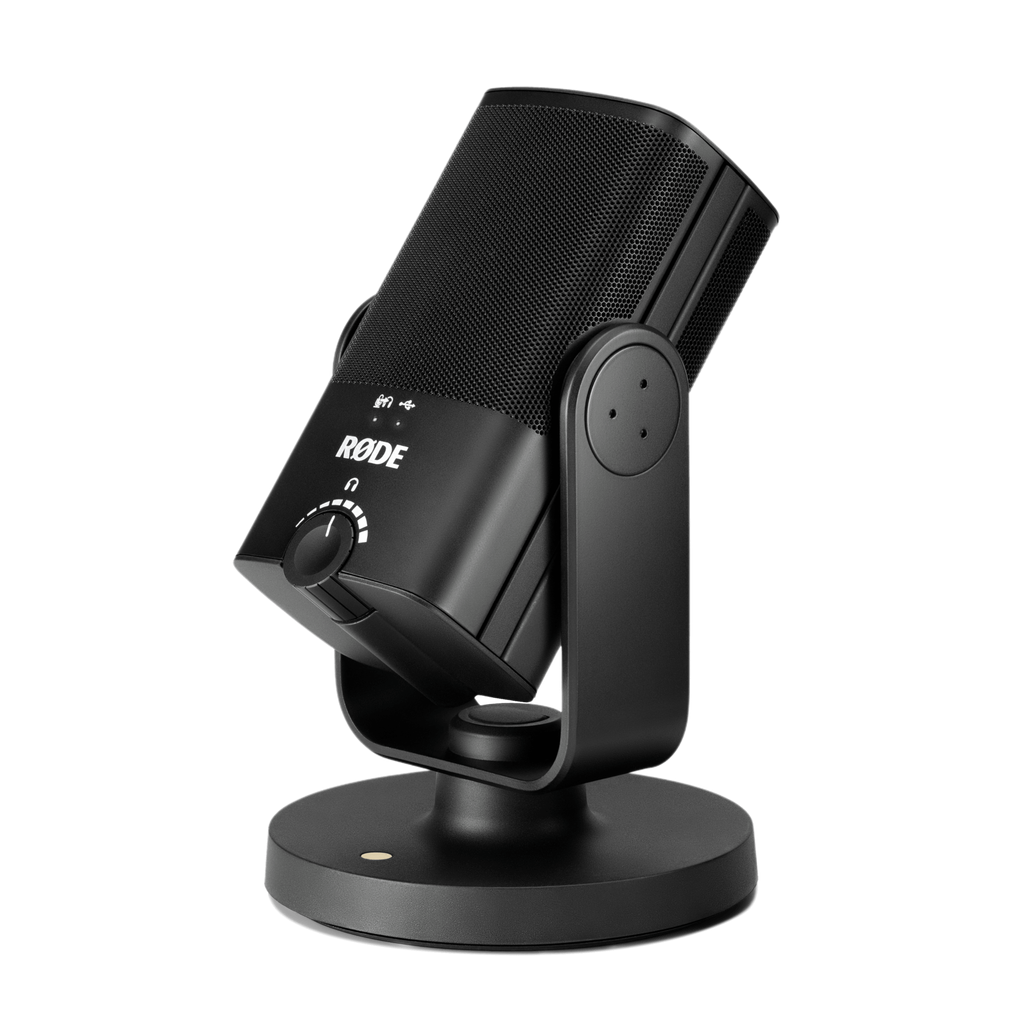
Image courtesy of RØDE
The RØDE NT-USB Mini is particularly interesting if you want a clean, compact desk setup without sacrificing useful recording features.
It uses a cardioid condenser capsule with a 20Hz–20kHz frequency response, 24-bit audio, and a 48kHz sample rate. It is USB bus-powered and provides a 3.5mm headphone output.
One of its strongest features is zero-latency headphone monitoring. This lets you hear your own microphone signal without the distracting delay that can occur when monitoring audio through software. RØDE also includes a studio-quality headphone amplifier with its own level control.
For a graduate student recording a presentation, teaching material, or interview, that can be much more useful than it sounds. You can immediately hear problems such as speaking too quietly, moving too far away from the microphone, or introducing unwanted noise.
The physical design is also clever. The NT-USB Mini uses a detachable magnetic desktop stand and a 360-degree swing mount, so positioning it on a desk or microphone arm is straightforward. RØDE also includes an internal pop filter.
It is not the least expensive microphone here, and its 48kHz maximum sample rate looks less impressive on paper than the 96kHz options. For spoken-word work, however, sample rate alone should not determine your purchase.
Pros
- Compact design
- 24-bit/48kHz recording
- Zero-latency headphone monitoring
- Built-in pop filter
- Detachable magnetic stand
- 360-degree swing mount
- Straightforward USB operation
Cons
- More expensive than the SoloCast 2
- Limited to 48kHz rather than 96kHz
- Condenser design still benefits from a relatively quiet room
Best for: Students who want a compact, well-built USB microphone for a small or minimalist desk.
Price: Check current price on Amazon
4. FIFINE K688 — Best USB/XLR Option
The FIFINE K688 is the most flexible microphone in this guide if you think your audio setup may grow later.
Unlike the three microphones above, the K688 is a dynamic cardioid microphone and supports both USB and XLR connections. FIFINE specifies a frequency response of 50Hz–16kHz and a signal-to-noise ratio above 80dB.
The dual connection is the important part.
You can start by plugging the K688 directly into your computer through USB. If you later begin recording podcasts, interviews, lectures, or other higher-production audio, you can move to an XLR audio interface without replacing the microphone.
That makes the K688 a useful middle ground between a basic USB microphone and a more traditional audio setup.
Its dynamic design also encourages closer microphone placement. In a bedroom, shared apartment, or workspace with keyboard and fan noise, using a directional dynamic microphone close to your mouth can make it easier to emphasize your voice relative to the room. That does not mean it magically eliminates background noise, but microphone placement becomes a useful tool.
The K688 also provides controls for USB use, including microphone mute, volume adjustment, and headphone monitoring. One thing to note is that FIFINE does not include an XLR cable, so moving to XLR later requires additional equipment.
Pros
- Dynamic microphone
- USB and XLR connectivity
- Cardioid pickup pattern
- Headphone monitoring
- Physical controls
- Provides an upgrade path to an audio interface
- Competitive price for a dual-connection microphone
Cons
- XLR cable is not included
- XLR use requires a separate audio interface
- Larger and more broadcast-style than compact desktop microphones
- Best results generally require speaking relatively close to the mic
Best for: Students who want to start with USB but may eventually build a more advanced recording or podcast setup.
Price: Check current price on Amazon
5. Shure MV6 — Best Premium
The Shure MV6 is the premium option in this comparison, and its strongest features are less about chasing high sample rates and more about making spoken audio easier to manage.
It is a cardioid dynamic microphone with USB-C connectivity and a 3.5mm headphone output. Shure specifies 16- or 24-bit conversion at 44.1 or 48kHz, with a 50Hz–15kHz frequency response.
The interesting part is the built-in DSP.
Shure includes Auto Level Mode, which automatically adjusts microphone gain based on your distance and speaking level. It also provides a Digital Popper Stopper, real-time denoising, a tone control, and high-pass filtering.
For a student who does not want to manually adjust audio settings before every recording, these features can be valuable.
For example, if you regularly record presentations or teach remotely, Auto Level can reduce the amount of attention you need to spend watching audio meters. The real-time denoiser may also help when there is fan, keyboard, or general room noise in the background.
There is also a tap-to-mute control, USB-C output, and real-time headphone monitoring. Settings can be managed through Shure’s MOTIV software.
The obvious disadvantage is price. If you mainly attend occasional Zoom meetings, a $40–$70 microphone already provides a significant improvement over most laptop microphones.
Pros
- Dynamic cardioid design
- Auto Level Mode
- Real-time noise reduction
- Digital pop filtering
- USB-C connection
- 3.5mm headphone monitoring
- Tap-to-mute
- MOTIV software controls
Cons
- Most expensive option in this comparison
- 48kHz maximum sample rate looks modest compared with some cheaper microphones
- Advanced processing may be unnecessary for basic meetings
Best for: Students, researchers, instructors, and creators who frequently record spoken audio and value automatic processing and background-noise control.
Price: Check current price on Amazon
Which USB Microphone Should You Choose?
The right microphone depends more on where and how you use it than on which model has the largest specification numbers.
For most graduate students, the Elgato Wave Neo is the most balanced option. It combines good recording specifications, headphone monitoring, mute controls, software support, and a convenient desktop design without moving into premium pricing.
If price matters most, the HyperX SoloCast 2 gives you the essential features for considerably less money.
The RØDE NT-USB Mini makes sense for a compact or minimalist desk, particularly if direct headphone monitoring is important.
If you want the option of moving from USB to a traditional XLR setup later, the FIFINE K688 is the most flexible.
And if you frequently record presentations, teaching material, voiceovers, or other spoken content and want automatic audio processing, the Shure MV6 offers the most advanced feature set.
Quick Recommendations
- Best overall: Elgato Wave Neo
- Best budget: HyperX SoloCast 2
- Best compact: RØDE NT-USB Mini
- Best USB/XLR option: FIFINE K688
- Best premium: Shure MV6
What to Look for in a USB Microphone for Graduate School
Condenser vs. Dynamic Microphones
This is one of the most important differences in this comparison.
A condenser microphone is generally sensitive and works well for capturing detailed speech in a controlled environment.
The Wave Neo, SoloCast 2, and NT-USB Mini are condenser microphones.
A dynamic microphone is often used closer to the speaker and can work well when you want your voice to dominate the recording relative to the room.
The K688 and MV6 are dynamic microphones.
Neither design is automatically better.
If your room is quiet and you want a microphone that can sit comfortably on your desk, a condenser mic is easy to use.
If you have keyboard noise, fans, roommates, or a less controlled room, a close-positioned cardioid dynamic microphone may be easier to work with.
USB vs. XLR
For most graduate students, USB is the simplest option.
Connect the microphone to your computer, select it as an input device, and start using it.
XLR microphones normally require an external audio interface, additional cables, and a little more setup.
That is why the FIFINE K688 is unusual: you can use USB now and still have the option of XLR later.
Unless you expect to build a more advanced recording setup, there is no need to choose XLR simply because it is considered more professional.
If your laptop has limited USB ports, a USB-C hub can make it easier to connect a microphone alongside other research accessories.
Sample Rate and Bit Depth
Specifications such as 24-bit/96kHz look impressive, but they should not dominate your purchasing decision for speech.
For online meetings, interviews, presentations, and most voice recordings, microphone placement, room acoustics, background noise, and speaking technique can make a much larger practical difference.
A well-positioned 24-bit/48kHz microphone can easily be more useful than a 96kHz microphone placed far away in a noisy room.
Headphone Monitoring
A headphone jack on the microphone allows you to hear what the microphone is actually capturing.
This is particularly useful when recording:
- Presentations
- Lectures
- Interviews
- Tutorials
- Podcasts
- Voiceovers
Direct or zero-latency monitoring is even better because you can hear yourself without an audible software delay.
The Wave Neo, NT-USB Mini, K688, and MV6 all provide monitoring options.
Mute Controls
A physical or touch-sensitive mute button is surprisingly useful during online meetings.
Instead of finding the mute control in Zoom, Teams, or another application, you can mute directly from the microphone.
This is particularly helpful if you use multiple meeting platforms and want one consistent control.
Microphone Positioning
Microphone positioning matters more than many first-time buyers expect.
A dedicated microphone does not need to sit directly in front of your mouth, but placing it too far away forces it to capture more of the room along with your voice.
For speech, try to position the microphone reasonably close and point the active side toward your mouth.
If desk space becomes a problem, many of these microphones can also be attached to a boom arm.
A laptop stand can also help free up desk space and make it easier to position a microphone closer to you.
Do You Really Need a Dedicated Microphone for Zoom?
Not necessarily.
If you attend one short meeting per week and your laptop microphone sounds clear enough, buying another device may not provide much value.
A dedicated microphone starts to make more sense if you:
- Attend frequent research meetings
- Give online presentations
- Teach or work as a TA
- Record lectures or tutorials
- Conduct remote interviews
- Create YouTube or educational content
- Record podcasts
- Want more consistent audio for job interviews
For those situations, audio quality can matter just as much as webcam quality.
USB Microphone vs. Headset Microphone
A headset microphone has one major advantage: it stays close to your mouth even when you move.
That makes headsets extremely practical for long meetings.
A desktop USB microphone, however, gives you more freedom to use whichever headphones or speakers you prefer, and it can provide a cleaner setup for presentations, recordings, or video interviews.
If your priority is convenience during calls, a headset may be enough.
If you also want to record content, interviews, or presentations, a dedicated USB microphone is usually more versatile.
If you prefer an all-in-one setup for long meetings, our guide to the best headphones for graduate students may also be useful.
FAQ
Is a USB microphone worth it for graduate students?
It can be if you regularly communicate online or record spoken content.
A USB microphone is particularly useful for research meetings, presentations, remote interviews, online teaching, recorded lectures, and content creation.
If you rarely use your microphone, your laptop or headset may already be sufficient.
Which USB microphone is best for Zoom?
Any of the five microphones in this guide can be used for online meetings.
For general use, the Elgato Wave Neo provides a balanced combination of simple setup, monitoring, and useful controls.
If you only need an inexpensive upgrade, the HyperX SoloCast 2 is sufficient for most meeting setups.
Which microphone is best for a noisy room?
A close-positioned dynamic microphone can be useful when you want to emphasize your voice relative to environmental sound.
The FIFINE K688 and Shure MV6 are both dynamic cardioid microphones.
The MV6 also includes Shure’s real-time denoising DSP, making it particularly interesting when background-noise processing is a priority.
Do I need an audio interface?
Not for the microphones in this guide when using their USB connections.
They can connect directly to a computer.
You only need an audio interface if you decide to use the XLR connection on the FIFINE K688 or move to another XLR-only microphone later.
Is 96kHz better than 48kHz for Zoom?
For normal video calls, it should not be a major purchasing factor.
Meeting platforms process and compress audio, and the practical difference is much smaller than improvements from better microphone placement and reduced background noise.
Higher sample rates can matter more in some recording workflows, but they are not necessary for routine academic calls.
Should I buy a condenser or dynamic microphone?
Choose based on your environment.
A condenser microphone is a straightforward option for a relatively quiet desk or home office.
A dynamic microphone is often used closer to the mouth and can be easier to manage when the surrounding room is less controlled.
Both can produce excellent spoken audio.
Can I use these microphones for recording interviews?
Yes, although a single cardioid microphone is usually optimized for one main speaker.
For a remote interview, each participant having their own microphone works well.
For two people physically sitting across from each other, you may eventually prefer a microphone arrangement specifically designed for multiple speakers.
Final Thoughts
A USB microphone is not essential for every graduate student, but it can be one of the most noticeable upgrades if much of your work involves speaking online.
The Elgato Wave Neo offers the most balanced package for everyday academic use, while the HyperX SoloCast 2 keeps the cost low for students who simply want clearer audio.
The RØDE NT-USB Mini is particularly appealing for compact desks, and the FIFINE K688 gives you a useful path from USB to XLR if your recording needs grow over time.
For frequent presentations, teaching, recording, or content creation, the Shure MV6 adds automatic level control and real-time audio processing that the simpler microphones do not provide.
Whichever microphone you choose, remember that placement and room noise often matter more than the specification sheet. A modest microphone positioned well can sound much better than an expensive microphone placed across the room.
If you regularly record lectures, interviews, or video content, an external SSD can also help manage larger audio and video files.
Prices and availability can change over time, so check the latest details before purchasing.