
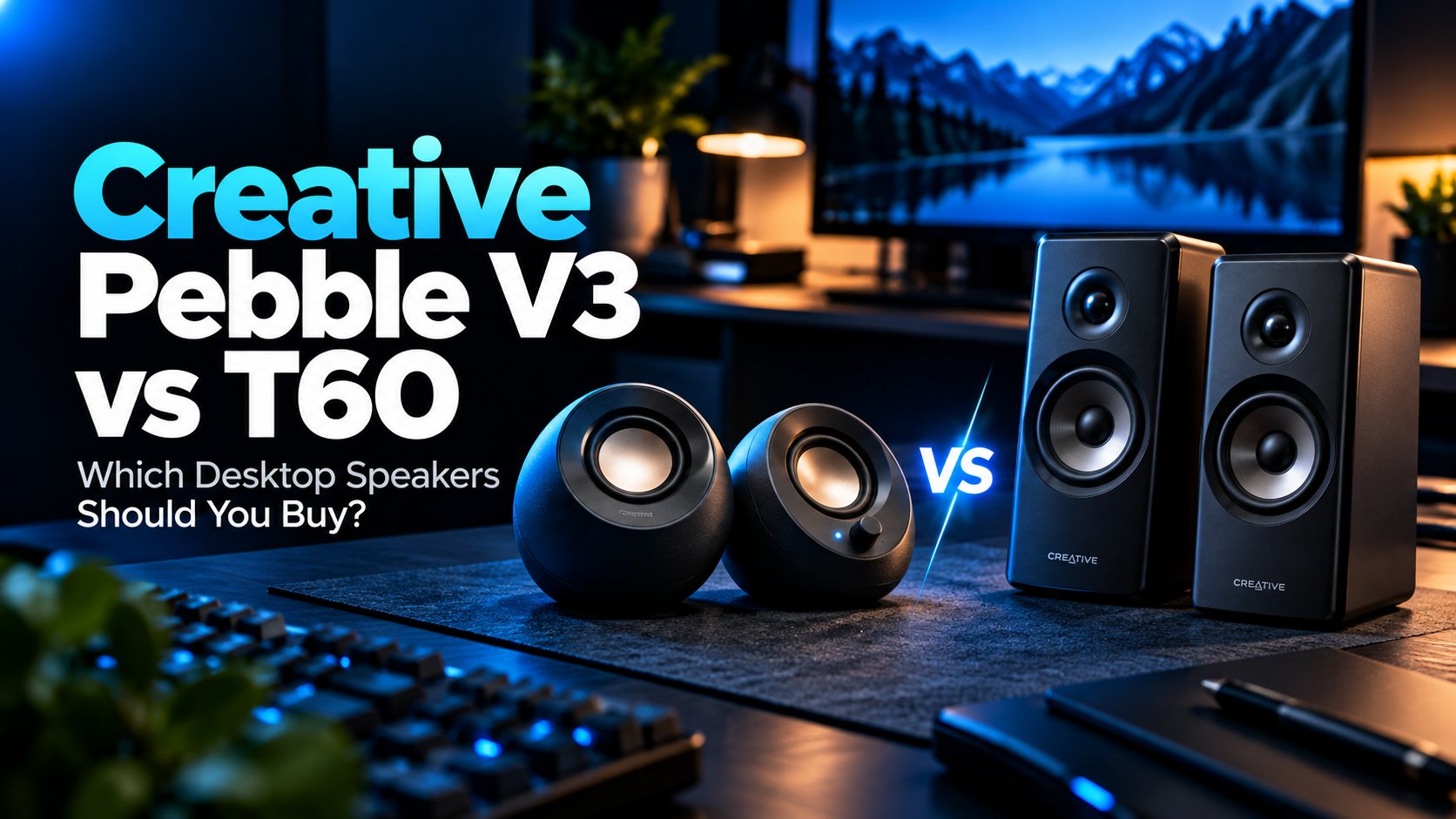
Choosing between the Creative Pebble V3 vs Creative T60 comes down to a simple question: do you need affordable speakers for everyday computer use, or are you willing to spend more for greater audio output and additional desktop features?
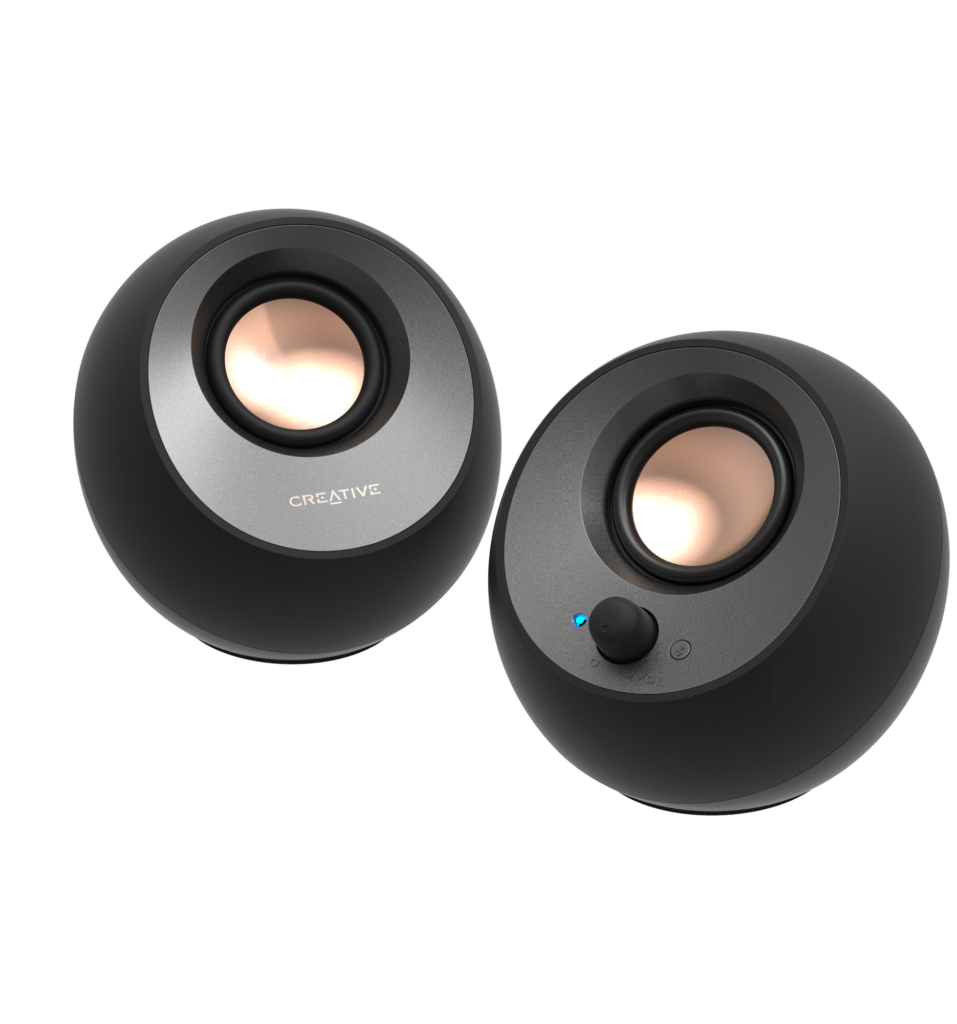
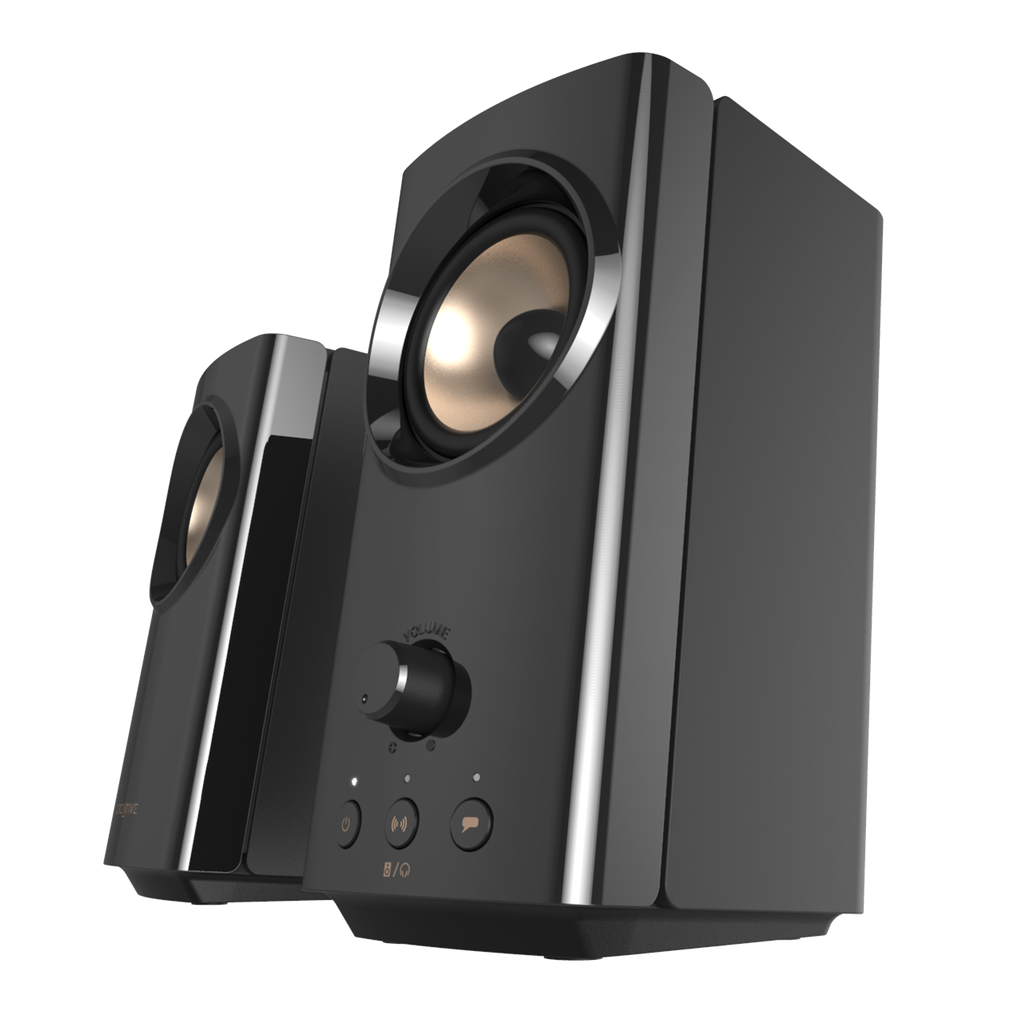
Image courtesy of Creative.
Both are 2.0 stereo speaker systems from Creative, and both support USB audio, Bluetooth 5.0, and a 3.5mm analog input.
However, the similarities largely end there.
The Pebble V3 focuses on affordability, compact dimensions, and convenient USB-powered operation. The Creative T60 offers more powerful amplification, larger drivers, additional audio controls, and dedicated headset connectivity.
For graduate students who spend hours at a computer writing papers, attending research meetings, watching lectures, and listening to music, these differences can significantly influence the buying decision.
Our quick verdict: We recommend the Creative Pebble V3 for most graduate students because its compact design, straightforward USB connection, and affordable pricing cover the essentials.
Choose the Creative T60 if you want more audio output, dedicated speaker and headphone switching, and additional communication features for a permanent desk setup.
In this comparison, we’ll examine the differences in specifications, audio capabilities, desk space, connectivity, online meetings, and overall value.
Amazon Affiliate Disclosure: As an Amazon Associate, GradToolLab earns from qualifying purchases at no additional cost to you.
Editorial Note: This comparison is based on Creative’s published specifications, available product information, and common graduate-student workflows. We have not independently conducted hands-on sound testing. Audio performance can vary depending on placement, room acoustics, source material, and personal preferences. Prices and availability may change.
Creative Pebble V3 vs Creative T60: Quick Verdict
Both speakers are useful upgrades for a laptop or desktop computer, but they are designed for different priorities.
Choose the Creative Pebble V3 if:
- You want an affordable desktop speaker system.
- You have a small or crowded desk.
- You prefer USB-powered speakers without a separate AC adapter.
- You primarily listen to lectures, podcasts, and everyday audio.
- You occasionally play music or watch videos.
- You want Bluetooth connectivity without spending much.
- You do not need headset or microphone ports on the speakers.
Choose the Creative T60 if:
- You want more audio output and larger speaker drivers.
- You regularly listen to music or watch movies at your desk.
- You participate in frequent online meetings.
- You want dedicated Clear Dialog and Surround controls.
- You use a wired headset or external microphone.
- You want to switch conveniently between speakers and headphones.
- You have an available power outlet.
- You are building a more permanent research workstation.
Our recommendation: The Pebble V3 provides the better balance of features and affordability for typical graduate-student use.
The T60 is worth considering when its additional output, physical controls, and communication features would be used regularly.
Neither speaker system is intended to replace dedicated studio monitors for professional audio production.
Creative Pebble V3 vs Creative T60: Specifications Compared
| Feature | Creative Pebble V3 | Creative T60 |
|---|---|---|
| Speaker configuration | 2.0 stereo | 2.0 stereo |
| Driver size | 2 × 2.25-inch | 2 × 2.75-inch |
| Maximum rated RMS output | 8W | 30W |
| Peak power | 16W | 60W |
| Frequency response | 100Hz–17kHz | 50Hz–20kHz |
| Bluetooth version | 5.0 | 5.0 |
| USB audio | Yes | Yes |
| 3.5mm AUX input | Yes | Yes |
| Power source | USB | AC adapter |
| Clear Dialog | Integrated processing | Dedicated on/off control |
| Surround enhancement | No dedicated control | Yes |
| Headset connection | No | Yes |
| Microphone input | No | Yes |
| SmartComms Kit | No | Windows via USB |
| Total speaker weight | Approx. 0.67 kg | Approx. 1.9 kg |
| Primary advantage | Compact and affordable | More powerful and feature-rich |
Specifications are based on Creative’s official product information. The Pebble V3’s maximum output requires an appropriate USB power source and gain setting. Rated frequency response and wattage alone do not establish subjective sound quality.
The most significant differences are amplifier output, speaker size, power requirements, and communication-related functionality.
1. Creative Pebble V3
BEST FOR MOST STUDENTS
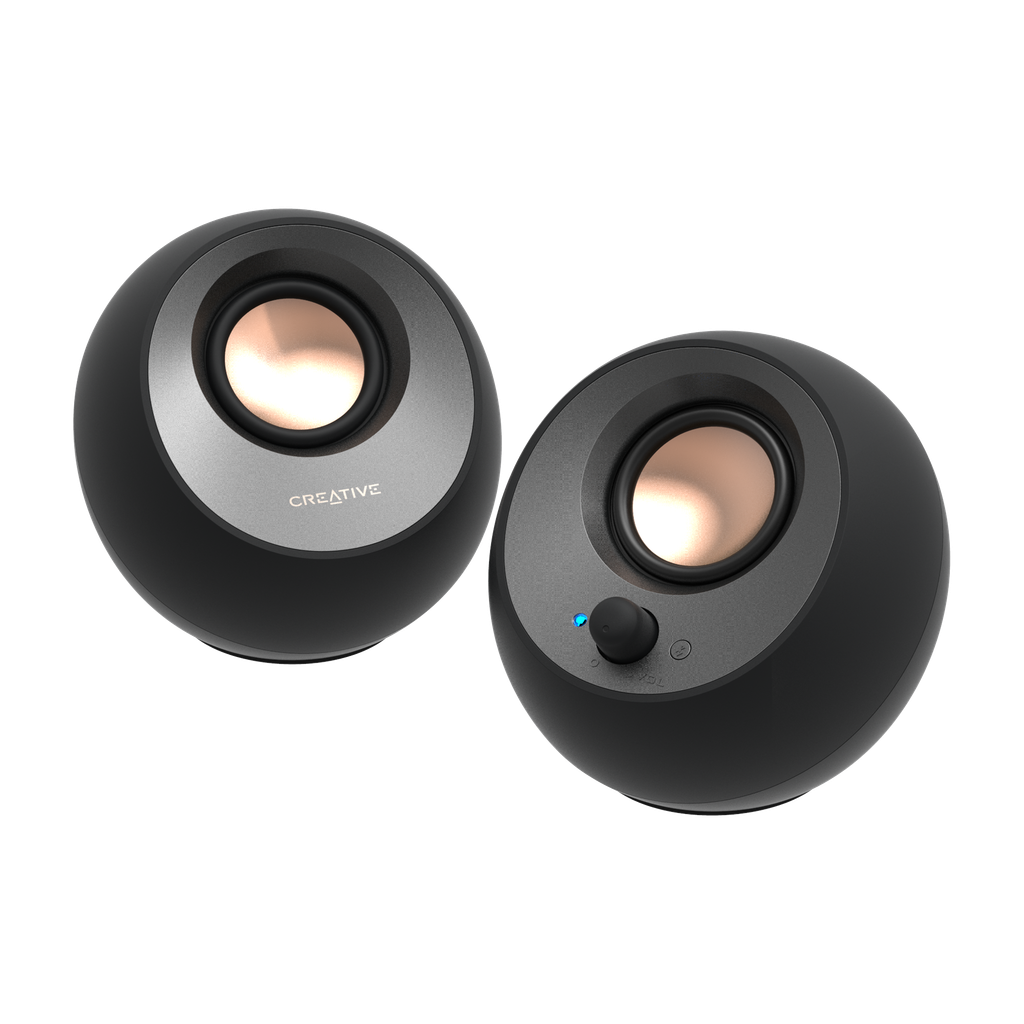
Best for: Graduate students who want affordable, compact desktop speakers for studying, research, lectures, and everyday entertainment.
Pros
- Affordable compared with the T60
- Compact, minimalist design
- Single USB-C connection for audio and power
- Bluetooth 5.0 connectivity
- 3.5mm AUX input
- Up to 8W RMS with sufficient USB power
- Angled speaker drivers
- Built-in Clear Dialog processing
- No separate AC power adapter required
Cons
- Considerably lower rated output than the T60
- Limited low-frequency extension
- No dedicated headset or microphone ports
- No physical Surround control
- Maximum output depends on USB power and gain settings
- Limited physical audio customization
The Creative Pebble V3 is our preferred speaker for most graduate students because it combines useful connectivity, an approachable price, and a particularly convenient design.
For many students, the goal is not to build an elaborate audio system.
Instead, they simply want something better than the speakers built into their laptop or monitor.
A typical research day might involve watching recorded lectures, attending online meetings, playing instructional videos, and listening to background music while writing a thesis.
The Pebble V3 is designed for these everyday applications.
Its two 2.25-inch full-range drivers provide stereo sound, while passive radiators help support low-frequency reproduction.
Creative specifies a maximum total output of 8W RMS when the speakers receive sufficient USB power and the appropriate gain setting is used.
That is substantially less than the Creative T60, but maximum output is not necessarily the most important factor when listening at moderate volume from a short distance.
We particularly appreciate the Pebble V3’s USB-C connection.
When connected to a compatible computer with adequate USB power, the same cable can carry digital audio and supply power to the speakers.
This reduces the number of cables and power adapters required on the desk.
The Pebble V3 also supports Bluetooth 5.0, allowing compatible smartphones and other devices to stream audio wirelessly.
A 3.5mm AUX input provides another option for devices with traditional analog audio outputs.
Creative also incorporates Clear Dialog processing, intended to emphasize speech in supported audio content.
However, unlike the T60, the Pebble V3 does not provide a dedicated physical button for enabling or disabling Clear Dialog.
Its most significant limitations are the modest rated output and relatively limited low-frequency extension.
Students who want stronger audio for music, movies, or larger rooms may prefer the T60.
Nevertheless, for everyday computer audio at a compact workstation, we believe the Pebble V3 delivers the features that matter most without unnecessary complexity.
We recommend the Pebble V3 for graduate students who:
- Use a laptop or desktop computer at a relatively small desk
- Frequently watch lectures and research presentations
- Listen to music while studying
- Want clearer everyday computer audio
- Prefer a simple setup without a wall power adapter
- Occasionally stream audio from a smartphone
- Want to keep their workstation affordable
The Pebble V3 is particularly suitable for students who regularly move or rearrange their desk equipment.
Its compact size makes it easy to position beside a monitor, laptop stand, or other accessories.
However, we would choose the T60 for users whose priorities include additional output, dedicated headset controls, or more advanced audio processing options.
- Product: Creative Pebble V3
- Model number: MF1700
- Speaker configuration: 2.0 stereo
- Drivers: 2 × 2.25-inch full-range
- Additional acoustic design: Passive radiators
- Maximum output: 8W RMS / 16W peak
- Frequency response: 100Hz–17kHz
- Signal-to-noise ratio: 75dB
- Connectivity: USB-C audio, Bluetooth 5.0, 3.5mm AUX
- Bluetooth codec: SBC
- Power: USB, with sufficient supply required for maximum output
- Controls: Volume/power knob, source selection, gain switch
- Dimensions per speaker: Approximately 123 × 120 × 118mm
- Combined satellite weight: Approximately 670g
- Compatibility: Supported Windows and macOS computers, Bluetooth audio devices, and devices with compatible analog audio outputs
Important: A USB-C port alone does not guarantee the maximum advertised output. The connected USB power source must meet Creative’s requirements.
2. Creative T60
BEST FOR PREMIUM DESK SETUPS
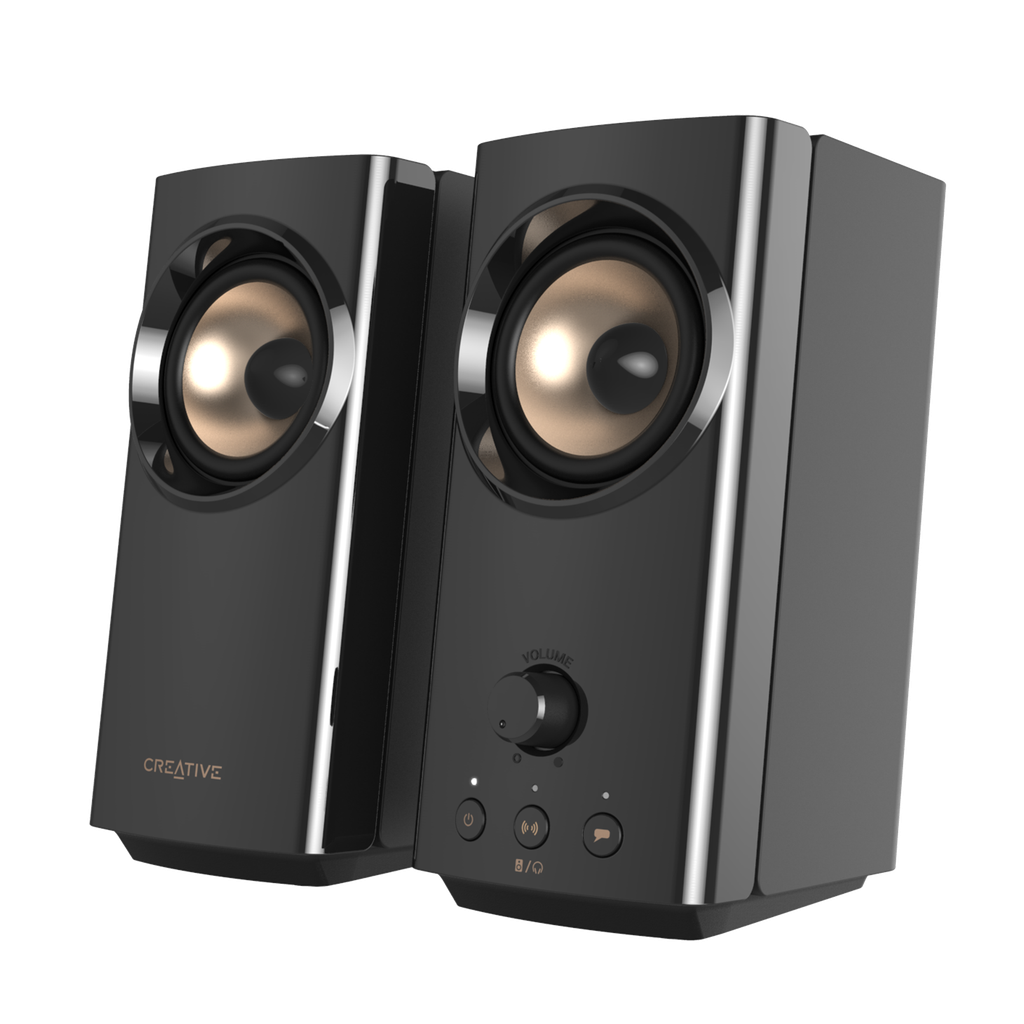
Best for: Graduate students who want more powerful desktop audio, convenient headset controls, and additional features for online communication.
Pros
- Up to 30W RMS total output
- Two larger 2.75-inch full-range drivers
- Dynamic BasXPort acoustic design
- Bluetooth 5.0, USB audio, and AUX input
- Dedicated Clear Dialog button
- Selectable Surround processing
- Headphone/headset and microphone connections
- Convenient speaker/headphone switching
- SmartComms Kit support on compatible Windows USB setups
- Narrow speaker cabinets suitable for monitor-side placement
Cons
- More expensive than the Pebble V3
- Requires a separate AC power adapter
- Taller and heavier speakers
- Less convenient to transport
- SmartComms Kit is not available through every connection method
- No built-in microphone
- No dedicated subwoofer
The Creative T60 is the more capable option for graduate students who want their computer speakers to do more than provide basic audio.
Its most obvious advantage is power.
Creative specifies a total output of up to 30W RMS, compared with the Pebble V3’s maximum of 8W RMS.
The T60 also uses larger 2.75-inch full-range drivers.
Its Dynamic BasXPort design is intended to improve bass performance without requiring a separate subwoofer.
Together, these characteristics give the T60 a stronger technical foundation for higher-output desktop listening.
However, we would not claim that it sounds a particular amount better without controlled listening measurements.
Actual sound quality depends on more than amplifier wattage, including enclosure design, frequency response, placement, and listening environment.
Beyond audio output, we particularly appreciate the T60’s communication features.
The speakers include dedicated Clear Dialog and Surround controls, allowing users to enable or disable these processing modes directly.
For someone who alternates between online lectures, research meetings, movies, and music, this is more flexible than a system with limited physical controls.
The T60 also provides headset and microphone connections.
This matters for students who sometimes want external speakers but need private listening during an online meeting.
Instead of constantly reconnecting accessories to a computer, users can connect a compatible wired headset to the speaker system.
The T60 also supports Creative’s SmartComms Kit on supported Windows computers connected through USB.
This software includes VoiceDetect and NoiseClean functions intended to improve communication workflows.
VoiceDetect can automatically manage microphone activation based on detected speech, while NoiseClean provides processing options for reducing certain types of background noise.
However, these functions require the appropriate Windows software configuration and a separate microphone or headset.
The speakers themselves do not include a built-in microphone.
The T60 therefore provides advantages beyond simply being louder.
Its additional physical controls and communication features make it more attractive for students who use their workstation for both research and entertainment.
The main disadvantages are cost, power requirements, and physical size.
Unlike the Pebble V3, the T60 needs an AC power adapter.
It is also substantially heavier.
For students working at one permanent desk, these tradeoffs may be acceptable.
For a compact and frequently rearranged setup, the Pebble V3 remains more convenient.
We recommend the Creative T60 for graduate students who:
- Spend substantial time at a permanent workstation
- Listen to music regularly while studying
- Frequently watch recorded presentations or lectures
- Participate in online research meetings
- Want easy switching between speakers and headphones
- Use a compatible external microphone or headset
- Prefer physical controls for audio processing
- Want more amplifier output than entry-level speakers provide
For example, a graduate student might spend the morning attending a research meeting, the afternoon analyzing data, and the evening watching a lecture or listening to music.
The T60’s connections and physical controls can accommodate these different activities without requiring a separate speaker system for each task.
However, the premium is difficult to justify if you only listen occasionally and never use the additional features.
- Product: Creative T60
- Model number: MF1705
- Speaker configuration: 2.0 stereo
- Drivers: 2 × 2.75-inch full-range
- Acoustic design: Dynamic BasXPort
- Maximum output: 30W RMS / 60W peak
- Frequency response: 50Hz–20kHz
- Signal-to-noise ratio: At least 75dB
- Connectivity: USB-C audio, Bluetooth 5.0, 3.5mm AUX
- Bluetooth codec: SBC
- Audio processing: Clear Dialog and Surround
- Connections: Headphone/headset output and microphone input
- Software: Creative App and SmartComms Kit on supported Windows USB configurations
- Power: External AC adapter, 18V DC output
- Speaker dimensions: Approximately 92mm wide × 199mm high; depths of 147mm and 157mm
- Combined speaker weight: Approximately 1.9kg
- Compatibility: Supported Windows and macOS computers, Bluetooth devices, and compatible analog audio sources
Important: SmartComms Kit requires a compatible Windows system, USB audio connection, and Creative software. The T60 does not have an integrated microphone.
Sound and Power: Is the Creative T60 Actually Better?
The T60 has a substantial specification advantage in amplifier output and driver size.
However, wattage alone does not determine audio quality.
Creative Pebble V3: Designed for Everyday Desktop Audio
The Pebble V3 uses two 2.25-inch full-range drivers with passive radiators.
Creative specifies a frequency response of 100Hz–17kHz.
For everyday tasks such as listening to lectures, watching educational videos, or playing music at moderate volume, this design may be sufficient.
The compact form factor is also beneficial for close-range listening at a desk.
However, smaller speakers with limited cabinet volume generally face greater challenges reproducing deep bass.
The Pebble V3’s published frequency response suggests more limited low-frequency extension than the T60, although the specifications do not provide enough information to quantify the perceived difference.
Creative T60: More Output and Larger Drivers
The T60 uses two 2.75-inch full-range drivers and a more powerful amplifier.
Its specified frequency response is 50Hz–20kHz.
Creative also includes Dynamic BasXPort technology to support bass reproduction.
These features make the T60 a more appealing choice for users who want additional output and potentially fuller low-frequency reproduction.
For example, students who listen to music frequently or watch movies at their desk may value the T60’s greater capabilities.
However, we would not interpret the frequency response specifications as proof of superior accuracy or fidelity.
Without standardized measurements and controlled listening tests, those qualities cannot be established from specifications alone.
Which Speaker Wins for Audio Capability?
Winner for rated output and driver size: Creative T60.
The T60 clearly offers more amplifier power, larger drivers, and a broader published frequency range.
For ordinary voice playback at moderate volume, however, those advantages may be less important.
Desk Space and Design: Which Fits a Graduate Student Workspace?
Desk space matters when your workstation already contains a monitor, laptop, keyboard, mouse, notebooks, and research equipment.
The two Creative models take different approaches to physical design.
Pebble V3: Compact and Low-Profile
The Pebble V3 uses Creative’s recognizable rounded enclosure.
Each speaker measures approximately 123mm high, 120mm wide, and 118mm deep.
This relatively low profile is convenient for students who want speakers positioned beside a laptop or beneath the lower edges of a monitor.
Its USB-powered operation also avoids the need for a separate wall adapter.
For students who prefer minimal cables and uncomplicated desk arrangements, this is a meaningful advantage.
T60: Taller but Narrower
The T60 has a noticeably different shape.
Each speaker is approximately 199mm high and 92mm wide.
Although the T60 is taller and deeper, its narrow front profile can help it fit beside a monitor.
Therefore, it would be misleading to say that the Pebble V3 occupies less desk space in every dimension.
The better choice depends on the available width, depth, and vertical clearance.
The T60 is also substantially heavier and requires separate power.
We see it as the more natural choice for a permanent desktop setup.
If you’re organizing a desk with several computer accessories, our best desk mats for graduate students guide explores different sizes and materials for compact and larger workstations.
Which Speaker Wins for Simplicity?
Winner: Creative Pebble V3.
The Pebble V3 is lighter, lower-profile, and easier to power directly from a compatible computer.
However, the T60’s narrow cabinets may fit better in certain monitor arrangements.
Connectivity: USB-C, Bluetooth, and AUX Compared
Both speaker systems provide three common audio connection options.
| Connection | Pebble V3 | T60 |
|---|---|---|
| USB digital audio | Yes | Yes |
| Bluetooth 5.0 | Yes | Yes |
| 3.5mm analog input | Yes | Yes |
| Headphone/headset output | No | Yes |
| Microphone input | No | Yes |
USB Audio
Both support digital audio through USB.
However, the power arrangements are different.
The Pebble V3 can obtain both audio and power through its USB-C connection when connected to a compatible source.
The T60 uses USB for audio but requires its separate AC adapter for power.
If you’re using a laptop with limited USB ports, you may also want to consider our best USB-C hubs for graduate students guide.
Bluetooth Audio
Both models support Bluetooth 5.0 and the SBC audio codec.
This allows wireless playback from compatible smartphones, laptops, and other devices.
Neither should be selected solely because of a Bluetooth version advantage, since they share the same version.
Actual wireless performance will depend on device compatibility, distance, and environmental conditions.
Analog Audio
Both models also support a 3.5mm AUX connection.
This is useful for computers, monitors, and audio devices that provide an analog stereo output.
A physical connection can be preferable when Bluetooth is inconvenient or unavailable.
Headset and Microphone Connections
This is where the T60 offers an additional capability.
It includes connections for compatible wired headphones, headsets, and microphones.
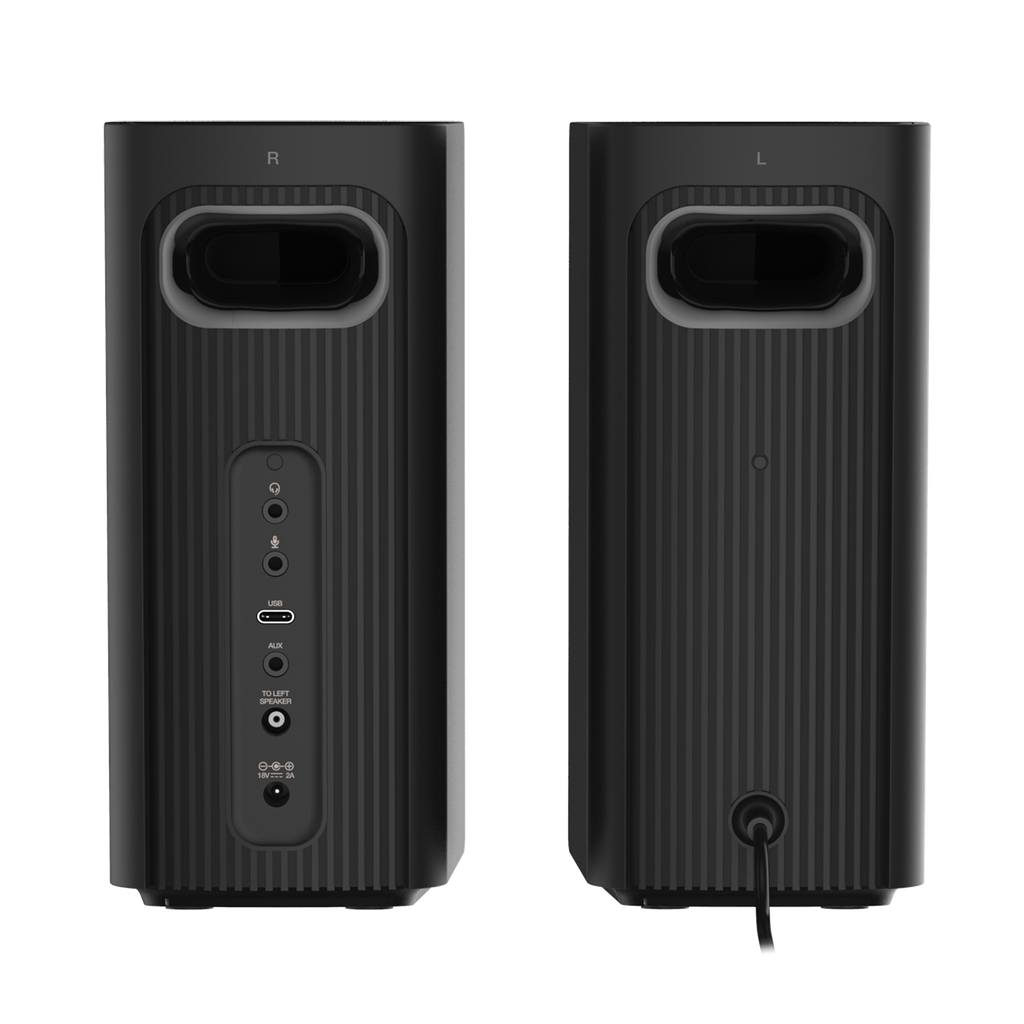
The Pebble V3 does not provide equivalent ports.
Which Speaker Wins for Connectivity?
Winner: Creative T60.
Both cover the essential audio inputs, but the T60 offers additional headset and microphone connectivity.
For someone who only needs USB audio and Bluetooth, the Pebble V3 may be just as practical.
Online Meetings and Voice Clarity: Which Is Better?
Graduate students often spend considerable time in online research meetings, academic interviews, virtual conferences, and remote teaching sessions.
Speaker quality matters for understanding other participants, but communication also depends on the microphone and software environment.
Pebble V3: Simple Voice Playback
The Pebble V3 incorporates Creative’s Clear Dialog processing.
This is intended to improve the prominence of spoken dialogue in supported content.
For recorded lectures, presentations, and ordinary computer audio, this may be a useful feature.
However, it does not provide the same dedicated controls and communication software options as the T60.
T60: More Communication Features
The T60 includes a physical Clear Dialog button and additional communication functionality.
Its SmartComms Kit offers VoiceDetect and NoiseClean processing on supported Windows USB setups.
For example, VoiceDetect can help manage microphone muting based on speech detection.
NoiseClean offers processing designed to reduce certain background noises during calls.
These features may be attractive to students who regularly present research remotely or participate in online discussions.
However, the limitations are important.
The T60 does not contain a microphone.
You still need a compatible external microphone, headset, or another microphone source.
SmartComms Kit also requires the appropriate Windows software and USB connection. Mac users and Bluetooth-only users should not assume that the same features will be available.
For students who want to improve the microphone side of their setup, our best USB microphones for graduate students guide compares options designed for meetings, interviews, and recording.
Similarly, our best webcams for graduate students guide covers cameras for virtual presentations and academic interviews.
Which Speaker Wins for Online Meetings?
Winner for additional communication features: Creative T60.
The T60 provides more connection and processing options.
However, the Pebble V3 can be sufficient for ordinary meeting playback, and neither system replaces a microphone.
Power Requirements: USB Convenience vs Dedicated AC Power
One practical difference is how the speakers receive power.
Pebble V3: USB-Powered Operation
The Pebble V3 receives power through USB.
This can make installation straightforward when a computer provides a suitable USB power source.
However, maximum advertised output requires adequate USB power.
Creative specifies up to 8W RMS under supported high-gain power conditions.
Depending on the available USB connection, users may need to adjust the gain switch or use a suitable external USB power adapter.
An underpowered connection may prevent the speakers from reaching their maximum output.
T60: External AC Adapter
The Creative T60 uses a dedicated AC adapter.
This allows its more powerful amplifier to operate without depending on a computer’s USB power supply.
However, it also requires an available electrical outlet.
For a permanent workstation, that may not be a major inconvenience.
For a desk with limited power connections or a setup that is frequently moved, it introduces additional equipment and cabling.
Which Speaker Wins for Power Convenience?
Winner: Creative Pebble V3.
Its USB-powered design is simpler for compatible computer setups.
The T60 is the better choice if higher output matters more than cable simplicity.
Creative Pebble V3 vs T60: Which Is Better for Music and Entertainment?
Not every graduate-student workstation is used exclusively for research.
Many students also listen to music, watch movies, play games, or enjoy other entertainment at their desks.
These activities may influence which speaker is worth buying.
For Background Music While Studying
We recommend the Pebble V3 for students who mainly listen to background music at moderate volume.
Its compact design and straightforward controls make it suitable for ordinary daily use.
The T60’s additional output may offer limited value if your preferred listening volume is consistently low.
For Frequent Music Listening
We would lean toward the T60.
Its larger drivers, greater rated output, and low-frequency-oriented enclosure design make it a more capable option on paper.
However, we would not describe it as a reference-quality music system.
Listeners who prioritize accuracy for audio production should compare purpose-built monitors rather than choosing solely between these two compact computer speaker systems.
For Movies and Videos
The T60’s selectable Surround processing and higher output may be attractive for entertainment.
However, Surround is an audio-processing effect rather than a physical multichannel speaker setup.
The T60 remains a two-speaker stereo system.
Whether the processing sounds preferable will depend on the content and listener.
For Private Listening
Neither speaker system is a substitute for headphones when privacy matters.
If you frequently work in shared laboratories, libraries, or graduate offices, headphones may be the more appropriate solution.
Our best headphones for graduate students guide compares alternatives for focused work, online meetings, and commuting.
Price and Value: Is the Creative T60 Worth the Extra Money?
For most buyers, this is the deciding factor.
During our review of Creative’s US online listings, the Pebble V3 was shown around $40, while the T60 was listed around $90.
These are indicative manufacturer-store prices rather than guaranteed Amazon prices. Both may change with promotions and availability.
That means the T60 can cost roughly twice as much as the Pebble V3.
The important question is not simply whether the T60 has more features.
It clearly does.
The important question is whether those additional features will improve how you use your computer.
When the T60 Is Worth Paying More For
We believe the extra cost is easier to justify if you regularly benefit from several of the following:
- Higher amplifier output
- Larger speaker drivers
- Dedicated Clear Dialog and Surround controls
- Headphone and speaker switching
- Microphone and headset connectivity
- Windows SmartComms features
- A permanent desktop workstation
For students who regularly use their computer for meetings, music, and entertainment, the T60’s additional functionality may be worth the premium.
When the Pebble V3 Is the Smarter Purchase
The Pebble V3 already provides the key features needed for basic desktop audio.
It supports USB audio, Bluetooth, AUX input, stereo playback, and compact placement.
If your main goal is to improve on built-in laptop or monitor speakers, you may not need anything more.
For thesis writing, recorded lectures, general browsing, and occasional entertainment, we believe the Pebble V3 offers the stronger value proposition.
Our Value Verdict
Winner for overall value: Creative Pebble V3.
The T60 is the more feature-rich system, but those features justify the additional cost only when they matter to your particular workflow.
Which Creative Speaker Should Graduate Students Buy?
Different academic activities place different demands on desktop speakers.
| Academic or Everyday Use | Our Recommendation |
|---|---|
| Reading and thesis writing | Pebble V3 |
| Recorded lectures | Either |
| Small study desk | Pebble V3 |
| Budget-conscious setup | Pebble V3 |
| Music at moderate volume | Pebble V3 |
| Higher-output music listening | T60 |
| Movies and entertainment | T60 |
| Frequent online meetings | T60 for extra features |
| Wired headset switching | T60 |
| Windows communication software | T60 |
| Minimal cable setup | Pebble V3 |
| Permanent workstation | Depends on priorities |
For Thesis Writing and General Research
We recommend the Pebble V3.
These tasks rarely require high speaker output or advanced audio processing.
A compact pair of speakers is sufficient for occasional videos, notifications, and background music.
For Online Lectures and Research Meetings
Either model can work well.
Choose the Pebble V3 if you mainly want to hear spoken content clearly.
Choose the T60 if you regularly use its dedicated controls or compatible Windows communication features.
For Programming and Data Analysis
We recommend choosing based on your listening habits rather than the software you use.
Programming and data analysis do not inherently require more powerful speakers.
If you primarily listen to music while working, the Pebble V3 may be the better value.
If your desk also serves as an entertainment station, the T60 becomes more attractive.
For Students Building a Premium Desk Setup
We prefer the T60 when audio plays a major role.
Its higher output, additional connections, and physical controls provide more versatility.
However, the best purchase is not necessarily the more expensive one.
Are the Pebble V3 and T60 the Only Computer Speakers Worth Considering?
No.
Both are useful options, but neither is ideal for every situation.
Students who prioritize audio production may prefer studio monitors.
Others may want a more affordable wired speaker or a system with a dedicated subwoofer.
Our 5 Best Computer Speakers for Graduate Students guide compares five different models, including the Pebble V3, Creative T60, Edifier MR4, Logitech Z207, and PreSonus Eris 3.5.
That broader comparison is a useful starting point if you’re still deciding what type of speaker system fits your desk.
Frequently Asked Questions
Is the Creative T60 Better Than the Pebble V3?
The Creative T60 has greater rated amplifier output, larger drivers, more connections, and additional audio controls.
However, we recommend the Pebble V3 for most graduate students because of its affordability and convenient USB-powered design.
Is the Creative T60 Worth the Extra Money?
It can be if you regularly use its additional output, headset connectivity, Clear Dialog and Surround controls, or Windows SmartComms features.
If you only need speakers for everyday computer audio, the Pebble V3 is likely the better value.
Does the Creative Pebble V3 Have Bluetooth?
Yes.
The Pebble V3 supports Bluetooth 5.0, allowing compatible devices to stream audio wirelessly.
It also supports USB digital audio and a 3.5mm AUX connection.
Does the Creative T60 Need a Power Outlet?
Yes.
The T60 requires an external AC power adapter.
The Pebble V3 is USB-powered, although adequate USB power is necessary to reach its maximum rated output.
Can the Creative T60 Be Used with a Mac?
Yes.
The T60 supports compatible Mac computers through USB audio and other supported connections.
However, the Windows-specific Creative App and SmartComms functions should not be assumed to work on macOS.
Does the Creative T60 Have a Built-In Microphone?
No.
The T60 provides microphone and headset connections, but it does not contain a built-in microphone.
A compatible external microphone or headset is required for voice input.
Do Both Speakers Support USB-C Audio?
Yes.
Both models support digital audio through USB-C.
The difference is that the Pebble V3 can receive audio and power through a suitable USB connection, while the T60 requires a separate power adapter.
Is the T60 Better for Bass?
The T60 has larger drivers, a broader published frequency response, and Creative’s Dynamic BasXPort design.
These specifications suggest greater low-frequency capability.
However, we would not make definitive claims about perceived bass quality without comparative listening measurements.
Which Speaker Is Better for a Small Desk?
We generally recommend the Pebble V3 for a compact, uncomplicated setup.
However, the T60’s speaker cabinets are narrower, so they may fit better beside some monitors.
Check the available width, depth, and height before choosing.
Can We Use These Speakers for Gaming?
Yes.
Both can reproduce audio from compatible gaming computers and other supported devices.
The T60 provides higher rated output and selectable Surround processing, but neither system is a true multichannel surround speaker arrangement.
Final Verdict: Creative Pebble V3 or Creative T60?
The Creative Pebble V3 and Creative T60 are both practical desktop speaker systems, but they serve different priorities.
Our overall recommendation is the Creative Pebble V3.
It provides USB audio, Bluetooth 5.0, AUX connectivity, stereo speakers, and a compact design at an affordable price.
For most graduate students who primarily write papers, attend online classes, watch lectures, and listen to music at moderate volume, it offers an attractive combination of simplicity and value.
However, the Creative T60 is our preferred choice for users who want more audio capabilities and desktop flexibility.
Its 30W RMS output, larger drivers, additional audio controls, headset connectivity, and supported communication software make it a stronger candidate for permanent workstations.
We believe the additional cost is worthwhile when those features are used regularly.
Otherwise, the Pebble V3 remains the more economical option.
Ultimately, the better choice depends on your desk space, budget, listening habits, and communication needs.
If you’re considering other options before purchasing, our best computer speakers for graduate students guide explores additional speaker systems for different budgets and research environments.

